
Integrated Lights-Out 3 technology




7
iLO 3 Advanced license for ProLiant ML-, DL-, and SL-systems, but the functionality is included with the iLO
3 Blade Standard package for ProLiant BL systems.
Refer to
“http://h20000.www2.hp.com/bc/docs/support/SupportManual/c00263709/c00263709.pdf” for
more details about using the Virtual Serial Port.
Integrated Remote Console
The Integrated Remote Console (IRC) combines the remote control capabilities of iLO 3—virtual KVM,
server power control, and virtual media—into a single user interface. It uses the .Net Framework
3.5/Windows Presentation Foundation (WPF) and makes use of DirectX technologies.
You will experience remote console performance that is equal to the performance of KVM and software-
based remote management solutions and over 8x the performance of iLO 2. This removes the need to
have one remote management tool for everyday administration and one for server recovery—iLO 3 is the
only tool you need for remote administration.
iLO 3 uses the Microsoft ClickOnce Installer as a deployment technology, creating a Windows-based
application. This technology lets you launch the iLO 3 IRC from Internet Explorer or Firefox and run IRC
outside of a browser.
Unlike iLO 2, the Key-Up/Key-Down setting is always on. The Caps Lock, Num Lock, and Scroll Lock keys
are fully functional when using the IRC. The iLO 3 IRC provides inherent International keyboard support
and no need for hot keys.
IRC provides additional iLO 3 capabilities such as console capture/reply, shared remote console, and
virtual folders.
Console capture and replay
Using console capture, you can record and replay a video stream of events such as the last boot
sequence, ASR-2 events, and OS faults. Console capture and replay is always on so that iLO 3 records
any action you take using IRC.
iLO 3 stores captured video data in an internal buffer area for boot sequences and for ASR-2 and OS
faults. With additional configuration, iLO 3 can export the captured data to an external file after the
buffer fills. The external file is stored on a web server on the network. iLO 3 continues to export captured
files to the specified web server every time there is a reboot or an OS failure, as long as space is
available. These files, each typically 2- to 3-MB, include a time stamp and an indicator of which type of
data they contain. If you manually run the capture function, the data is stored on the client machine. Files
created in this manner can be of any size.
You can view the exported video capture files using the IRC application or a stand-alone tool for
Windows called the HP iLO Video Player. HP iLO Video Player lets you play back video capture files
without installing iLO on your client machine. iLO Video Player uses similar controls as a typical media
player. Typically, iLO Video Player resides on the client, but you could run it on a server.
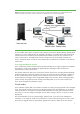
Shared remote console
iLO 3 supports sharing a remote console session with up to six users. The administrator who initiates a
remote console session connects to the managed server normally and is designated the session leader.
When another administrator tries to connect to iLO 3 in a second remote console session, iLO 3 transmits
the IP address of the session leader’s computer back to the new client session. Thus, subsequent shared
remote console sessions become satellite clients to the session leader (Figure 4).