
HP iLO Federation User Guide
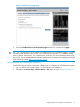
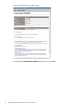


Figure 2 OA Enclosure Settings page
3. Select the Enable Enclosure iLO Federation Support check box, and then click Apply.
TIP: You can also use the CLI to enable or disable Enclosure iLO Federation Support. To enable
the setting, enter ENABLE ENCLOSURE_ILO_FEDERATION_SUPPORT. To disable the setting,
enter DISABLE ENCLOSURE_ILO_FEDERATION_SUPPORT. For more information about using
the OA CLI, see the HP BladeSystem Onboard Administrator Command Line Interface User Guide
at the following website: http://www.hp.com/go/oa.
Verifying server iLO Federation capability
Use the following procedure to verify that a blade server is configured for iLO Federation support.
1. Log in to the OA web interface (https://<OA hostname or IP address>).
2. Navigate to the Device Bays→<Device Name>→iLO page, as shown in Figure 3 (page 12).
Configuring enclosure support for iLO Federation 11