
HP iLO 4 User Guide



2. Open the Agentless Management Service Control Panel.
3. Click the Service tab.
If AMS is enabled, the following message appears:
Agentless Management Service (AMS) is enabled.
Verifying AMS installation: SUSE and Red Hat
To verify that AMS is installed on a SUSE or Red Hat system, enter the following command:
rpm –qi hp-ams
To verify that AMS is running on a SUSE or Red Hat system, enter the following command:
service hp-ams status
Verifying AMS installation: VMware
To verify that AMS is installed on a VMware system:
1. Access the VMware host from the VMware vSphere Client.
2. Navigate to the server’s Inventory→Configuration→Health Status tab.
3. Click the plus sign (+) next to Software Components.
The software installed on the host is listed. The AMS component includes the string hp-ams.
NOTE: The full name of the AMS component is different for each supported version of
ESX/ESXi.
To verify that AMS is running on a VMware system, enter the following command:
service hp-ams status
Verifying AMS installation: Ubuntu
To verify that AMS is installed on an Ubuntu system, enter the following command:
dpkg –l hp-ams
To verify that AMS is running on an Ubuntu system, enter the following command:
sudo service hp-ams status
Configuring SNMP settings
1. Navigate to the Administration→Management page.
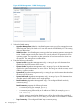
2. Click the SNMP Settings tab, as shown in Figure 48 (page 110).
Configuring iLO Management settings 109