
HP iLO 4 Scripting and Command Line Guide
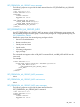
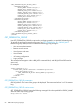

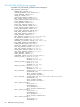
IPV6_GATEWAY="::"
ADDR_STATUS="INACTIVE"/>
<IPV6_PRIM_DNS_SERVER VALUE="::"/>
<IPV6_SEC_DNS_SERVER VALUE="::"/>
<IPV6_TER_DNS_SERVER VALUE="::"/>
<IPV6_DEFAULT_GATEWAY VALUE="::"/>
<IPV6_PREFERRED_PROTOCOL VALUE="Y"/>
<IPV6_ADDR_AUTOCFG VALUE="Y"/>
<IPV6_REG_DDNS_SERVER VALUE="Y"/>
<DHCPV6_STATELESS_ENABLE VALUE="Y"/>
<DHCPV6_STATEFUL_ENABLE VALUE="Y"/>
<DHCPV6_RAPID_COMMIT VALUE="N"/>
<DHCPV6_SNTP_SETTINGS VALUE="N"/>
<DHCPV6_DNS_SERVER VALUE="Y"/>
</GET_NETWORK_SETTINGS>
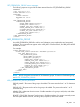
If the request is unsuccessful, you might receive the following message:
<RESPONSE
STATUS = "0x0001"
MSG = "Error Message"/>
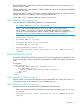
• For IPV6_ADDRESS the ADDR_STATUS=”string”, will report status of “Pending”, “Active”, or
“Failed” for each address. Pending indicates the Duplicate Address Detection (DAD) test is
still in progress, Failed indicates that a duplicate address was found on the network and the
address is not currently in use by iLO, and Active indicates that DAD passed and the address
is in use by iLO.
• For IPV6_ADDRESS the ADDR_SOURCE=”string” will report status of “Static” or “SLAAC”
indicating the configuration source for that address. SLAAC indicates RFC 4862 Stateless
Address Auto Configuration.
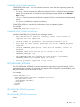
• For IPV6_STATIC_ROUTE_[1:3] the ADDR_STATUS=”string” will report status of “Active” or
“Failed” for each static route configured. Active indicates the route was accepted by the
networking stack and is in use. Failed indicates the route was rejected by the networking
stack, typically this is due to a “No route to source” error for the specified gateway. In this
case, iLO will periodically retry setting the static route as long as it remains configured (a
route to the gateway may be discovered in the future through router advertisements or further
iLO address configuration.)
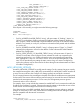
MOD_NETWORK_SETTINGS
Use MOD_NETWORK_SETTINGS to modify network settings. For this command to parse correctly,
the command must appear within a RIB_INFO command block, and RIB_INFO MODE must be set
to write. The user must have the Configure iLO Settings privilege to execute this command.
The iLO scripting firmware does not attempt to decipher if the network modifications are appropriate
for the network environment. When modifying network settings, be aware of the network commands
provided to the management processor. In some cases, the management processor ignores
commands and no error is returned.
For example, when a script includes the command to enable DHCP and a command to modify the
IP address, the IP address is ignored. Changing the network settings to values that are not correct
for the network environment might cause a loss of connectivity to iLO.
Once the script has successfully completed, the iLO management processor reboots to apply the
changes. If connectivity to iLO is lost, use the RBSU to reconfigure the network settings to values
that are compatible with the network environment.
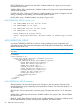
For example:
<RIBCL VERSION="2.0">
<LOGIN USER_LOGIN="adminname" PASSWORD="password">
RIB_INFO 89