
HP iLO 4 Scripting and Command Line Guide


GET_FEDERATION_GROUP return messages
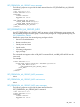
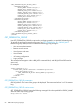
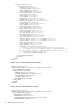
The following response is typical of the data returned from the GET_FEDERATION_GROUP
command:
<?xml version="1.0"?>
<RIBCL VERSION="2.23">
<RESPONSE
STATUS="0x0000"
MESSAGE='No error'
/>
<GET_FEDERATION_GROUP>
<FEDERATION_GROUP>
<GROUP_NAME VALUE="Group2"/>
<ADMIN_PRIV VALUE="Yes"/>
<REMOTE_CONS_PRIV VALUE="Yes"/>
<RESET_SERVER_PRIV VALUE="No"/>
<VIRTUAL_MEDIA_PRIV VALUE="No"/>
<CONFIG_ILO_PRIV VALUE="Yes"/>
<LOGIN_PRIV VALUE="Yes"/>
</FEDERATION_GROUP>
</GET_FEDERATION_GROUP>
</RIBCL>
ADD_FEDERATION_GROUP
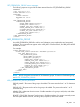
Use ADD_FEDERATION_GROUP to add a new Federation group membership and associated
privileges. The command must appear within a RIB_INFO command block, and RIB_INFO MODE
must be set to write.
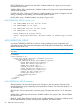
For example:
<RIBCL VERSION="2.0">
<LOGIN USER_LOGIN="adminname" PASSWORD="password">
<RIB_INFO MODE="write">
<ADD_FEDERATION_GROUP
GROUP_NAME="groupname"
GROUP_KEY="groupkey">
<ADMIN_PRIV VALUE="Yes"/>
<REMOTE_CONS_PRIV VALUE="Yes"/>
<RESET_SERVER_PRIV VALUE="Yes"/>
<VIRTUAL_MEDIA_PRIV VALUE="Yes"/>
<CONFIG_ILO_PRIV VALUE="Yes"/>
<LOGIN_PRIV VALUE="Yes"/>
</ADD_FEDERATION_GROUP>
</RIB_INFO>
</LOGIN>
</RIBCL>
NOTE: HP iLO 4 supports a maximum of 10 Federation groups. To remove a Federation group,
use DELETE_FEDERATION_GROUP.
ADD_FEDERATION_GROUP parameters
GROUP_NAME—The name of the group to be added. The name must be from 1 to 31 characters
long.
GROUP_KEY—The password to set for the group to be added. The password must be 1 to 31
characters long.
ADMIN_PRIV—Administer User Accounts—Enables members of a group to add, edit, and delete
iLO user accounts.
REMOTE_CONS_PRIV—Remote Console Access—Enables members of a group to remotely access
the host system Remote Console, including video, keyboard, and mouse control.
RIB_INFO 83