
HP iLO 4 Scripting and Command Line Guide
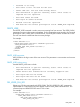
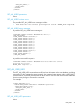
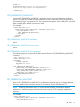

COUNT="1"
DESCRIPTION="POST Error: 1775-Drive Array -
ProLiant Storage System not Responding" />
...
</EVENT_LOG>
GET_FEDERATION_MULTICAST
Use the GET_FEDERATION_MULTICAST command to retrieve the current federation multicast
options. The response includes values for Multicast Discovery, Multicast Announcement Interval,
IPv6 Multicast Scope, and Multicast TTL. The command must appear within a RIB_INFO command
block, and RIB_INFO MODE must be set to read.
For example:
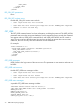
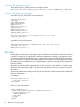
<RIBCL VERSION="2.0">
<LOGIN USER_LOGIN="adminname" PASSWORD="password">
<RIB_INFO MODE="read">
<GET_FEDERATION_MULTICAST/>
</RIB_INFO>
</LOGIN>
</RIBCL>
GET_FEDERATION_MULTICAST parameters
None
GET_FEDERATION_MULTICAST runtime errors
None
GET_FEDERATION_MULTICAST return messages
The following response is typical of the data returned from the GET_FEDERATION_MULTICAST
command:
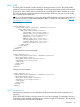
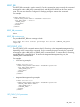
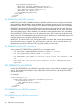
<?xml version="1.0"?>
<RIBCL VERSION="2.23">
<RESPONSE
STATUS="0x0000"
MESSAGE='No error'
/>
<GET_FEDERATION_MULTICAST>
<MULTICAST_DISCOVERY_ENABLED VALUE="Yes"/>
<MULTICAST_ANNOUNCEMENT_INTERVAL VALUE="60"/>
<IPV6_MULTICAST_SCOPE VALUE="Site"/>
<MULTICAST_TTL VALUE="255"/>
</GET_FEDERATION_MULTICAST>
</RIBCL>
SET_FEDERATION_MULTICAST
Enter the SET_FEDERATION_MULTICAST to set federation multicast options, including Multicast
Discovery, Multicast Announcement Interval, IPv6 Multicast Scope, and Multicast TTL.
NOTE: Disabling multicast discovery or announcements disables iLO federation features.
All devices in a federated group must have the same scope and TTL to properly enable peer
discovery.
For example:
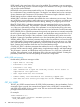
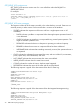
<RIBCL VERSION="2.0">
<LOGIN USER_LOGIN="adminname" PASSWORD="password">
<RIB_INFO MODE="write">
RIB_INFO 79