
HP iLO 4 Scripting and Command Line Guide

Unsupported Microsoft Windows quote characters:
Support for Windows-specific smart-quotes (“ ” and ‘ ’) as content delimiters in XML is being phased
out. Be sure to replace any smart-quote characters in your script with normal double or single
quotes (" and ').
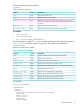
Specific string
A specific string is one that is required to contain certain characters. In general, you have a choice
of words that are accepted as correct syntax and all other words produce an error.
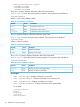
Boolean string
A Boolean string is a specific string that specifies a yes or no condition. Acceptable Boolean
strings are yes, no, true, false, y, n, t, f, 1, and 0. These strings are not case sensitive.
Response definitions
Every command that is sent to iLO generates a response. The response indicates whether the
command succeeded or failed. Some commands generate additional information. The additional
information appears in execution sequence, provided no errors occurred.
For example:
<RESPONSE
STATUS="0x0001"
MSG="There has been a severe error."/>
• RESPONSE
This tag name indicates that iLO is sending a response to the previous commands back to the
client application to indicate the success or failure of the commands that have been sent to
iLO.
• STATUS
This parameter contains an error number. The number 0x0000 indicates that no error exists.
• MSG
This element contains a message describing the error that happened. If there is no error, the
No error message appears.
RIBCL
This command is used to start and end a RIBCL session. You can use it only once to start a RIBCL
session, and it must be the first command to display in the script. The RIBCL tags are required to
mark the beginning and the end of the RIBCL document.
For example:
<RIBCL VERSION="2.0">
</RIBCL>
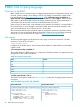
RIBCL parameters
VERSION is a string that indicates the version of the RIBCL that the client application is expecting
to use. The VERSION string is compared to the version of the RIBCL that is expected, and an error
message is returned if the first number of the string and the version (major version) do not match.
The preferred value for the VERSION parameter is 2.X. For example, if the string is 2.20 and the
expected major version number is 2, no errors message is sent. However, if the VERSION string
is 1.X and the expected version is 2, then the different versions may introduce compatibility issues.
If there is a major version mismatch, the following inform message is sent:
66 RIBCL XML Scripting Language