
HP iLO 4 Scripting and Command Line Guide
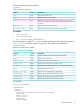
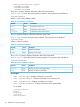
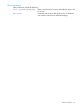
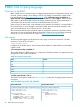
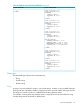
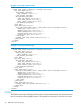
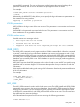
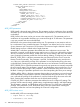

Table 30 XMLILO output (GET_FW_VERSION) (continued)
Output without headerOutput with header
/>
</RIBCL>
<?xml version="1.0"?>
<RIBCL VERSION="2.22">
<RESPONSE
STATUS="0x0000"
MESSAGE='No error'
/>
</RIBCL>
<?xml version="1.0"?>
<RIBCL VERSION="2.22">
<RESPONSE
STATUS="0x0000"
MESSAGE='No error'
/>
</RIBCL>
<?xml version="1.0"?>
<RIBCL VERSION="2.22">
<RESPONSE
STATUS="0x0000"
MESSAGE='No error'
/>
<GET_FW_VERSION
FIRMWARE_VERSION = "1.60"
FIRMWARE_DATE = "Feb 27 2013"
MANAGEMENT_PROCESSOR = "iLO4"
LICENSE_TYPE = "iLO Advanced"
/>
</RIBCL>
<?xml version="1.0"?>
<RIBCL VERSION="2.22">
<RESPONSE
STATUS="0x0000"
MESSAGE='No error'
/>
</RIBCL>
<?xml version="1.0"?>
<RIBCL VERSION="2.22">
<RESPONSE
STATUS="0x0000"
MESSAGE='No error'
/>
</RIBCL>
Data types
The three data types allowed in the parameter are:
• String
• Specific string
• Boolean string
String
A string is any text enclosed in quotes. It can include spaces, numbers, or any printable character.
A string must start with either a double or single quote, and it must end with the same type of quote.
The string can contain a quote if it is different from the string delimiter quotes.
For example, if a string starts with a double quote, a single quote can be used within the string
and the string must be closed with a double quote.
Overview of the RIBCL 65