
HP iLO 4 Scripting and Command Line Guide

8 RIBCL XML Scripting Language
Overview of the RIBCL
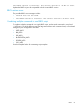
RIBCL enables you to write XML scripts to configure and manage iLO 4 configuration settings, user
accounts, directory settings, server settings, and HP SSO settings. Download the sample scripts
from the HP website at http://www.hp.com/go/ilo. Click iLO Sample Scripts for Windows or
Lights-Out XML scripting sample for Linux on the Resources tab, under Support.. Before using the
XML sample scripts downloaded from the HP website, read the firmware support information in
each sample script to tailor the script for the intended firmware and version.
When writing your XML scripts, write comments in the command as needed. If a comment falls in
the command line, an error message is generated. Unless otherwise specified, examples in this
guide are specifically for iLO 4 firmware version 1.40 and later.
This section describes the XML commands and their parameters common to most LOM products
and servers. For more information about the ProLiant BL c-Class server and rack XML commands,
see the HP iLO User Guide on the HP website at: http://www.hp.com/go/ilo/docs.
XML headers
The following XML header must be present in every script, to ensure the connection is an XML
connection, not an HTTP connection:
<?xml version="1.0"?>
In addition to the header above, with the latest utilities update two other headers can be added
in RIBCL scripts:
<?ilo entity-processing="standard"?>
This header added to a RIBCL script (or in a response) will take five entities in a quoted string and
change them to their symbol equivalents:
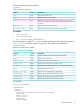
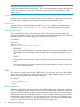
Table 29 Accepted script entities
SymbolEntity
<<
>>
&&
''
""
<?xmlilo output-format="xml"?>
This header will accept five entities (see Table 29 (page 64)) along with changing output to minimum
of response.
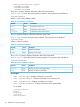
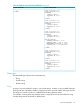
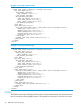
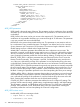
Table 30 XMLILO output (GET_FW_VERSION)
Output without headerOutput with header
C:\data\iLo\scripts>perl locfg.pl -s servername -f get_fw_version.xml -u admin -p admin123
<?xml version="1.0"?>
<RIBCL VERSION="2.22">
<?xml version="1.0"?>
<RIBCL VERSION="2.22">
<RESPONSE
STATUS="0x0000"<GET_FW_VERSION
MESSAGE='No error' FIRMWARE_VERSION = "1.60"
/> FIRMWARE_DATE = "Feb 27 2013"
MANAGEMENT_PROCESSOR = "iLO4"
LICENSE_TYPE = "iLO Advanced"
64 RIBCL XML Scripting Language