
HP iLO 4 Scripting and Command Line Guide
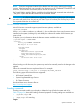
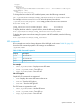
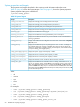

Targets
Properties
bootorder=2
oemhp_description=Embedded FlexibleLOM 1 Port 1 : HP FlexFabric 10Gb 2-port
534FLB Adapter (IPv6)
Verbs
cd version exit show set
To change the boot order for UEFI enabled systems, enter the following command:
set /system1/bootconfig1/oemhp_uefibootsource<n> bootorder=<num>.
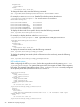
For example, to move uefibootsource2 to be the primary boot device:
</system1/bootconfig1>hpiLO-> set oemhp_uefibootsource2 bootorder=1
Bootorder being set.
oemhp_uefibootsource2=534FLB Adapter (IPv6) bootorder=1
oemhp_uefibootsource1=534FLB Adapter (IPv4) bootorder=2
To display the boot order for a specific device, enter the following command:
show /system1/bootconfig1/oemhp_uefibootsource<n>/bootorder
To display the system secure boot setting for systems with UEFI enabled, enter the following
command:
show /system1/bootconfig1/oemhp_secureboot
LED commands
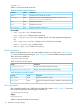
LED commands are used to change the state of the UID light on the server. Table 22 (page 59)
shows the LED command properties. LED settings are available at:
/system1/led1
Table 22 LED Command Properties
DescriptionProperty
Turns the LED on.start
Turns the LED off.stop
Displays the LED status.show
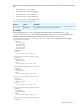
For example
• show /system1/led1—Displays current LED status
• start /system1/led1—Turns LED on
• stop /system1/led1—Turns LED off
iLO 4 CLI support
Simple UID CLI commands are supported:
• uid—Displays the current UID state on the server.
• uid on—Turns the UID light on.
• uid off—Turns the UID light off.
The CLP format is supported as well:
• show /system1/led1—Verifies LED status
• start /system1/led1—Turns LED on
• stop /system1/led1—Turns LED off
Specific commands 59