
HP iLO 4 Scripting and Command Line Guide
Properties
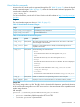
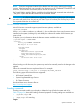
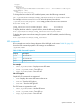
bootorder=5
Verbs
cd version exit show set
To change the boot order, enter the following command:
set /system1/bootconfig1/bootsource<n> bootorder=<num>.
For example, to move bootsource1 (BootfmCd) to be the primary boot device:
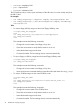
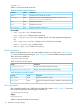
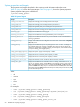
</system1/bootconfig1>hpiLO-> set bootsource1 bootorder=1
Bootorder being set.
bootsource1=BootFmCd bootorder=1
bootsource3=BootFmDisk bootorder=2
bootsource2=BootFmFloppy bootorder=3
bootsource4=BootFmUSBKey bootorder=4
bootsource5=BootFmNetwork bootorder=5
To display the boot order for a specific device, enter the following command:
show /system1/bootconfig1/bootsource<n>
For example, to display the boot order for bootsource1:
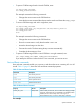
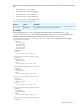
</system1/bootconfig1>hpiLO-> show /system1/bootconfig1/bootsource1
/system1/bootconfig1/bootsource1
Targets
Properties
bootorder=1
Verbs
cd version exit show set
To display the current boot mode, enter the following command:
show /system1/bootconfig1/oemhp_bootmode
To display the pending boot mode (which will be active on the next boot), enter the following
command:
show /system1/bootconfig1/oemhp_pendingbootmode
UEFI enabled systems
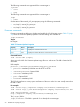
When configuring the UEFI bootorder, first list the current boot order by entering show -all
/system1/bootconfig1. For systems that support UEFI, the targets are listed in their respective
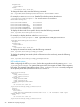
boot order. The example output below shows oemhp_uefibootsource1 is currently configured
as the primary boot device, because it has a bootorder=1
/system1/bootconfig1
Targets
oemhp_uefibootsource1
oemhp_uefibootsource2
Properties
oemhp_bootmode=UEFI
oemhp_secureboot=no
oemhp_pendingbootmode=UEFI
Verbs
cd version exit show set
/system1/bootconfig1/oemhp_uefibootsource1
Targets
Properties
bootorder=1
oemhp_description=Embedded FlexibleLOM 1 Port 1 : HP FlexFabric 10Gb 2-port
534FLB Adapter (IPv4)
Verbs
cd version exit show set
/system1/bootconfig1/oemhp_uefibootsource2
58 SMASH CLP Scripting Language