
HP iLO 4 Scripting and Command Line Guide
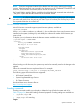

NOTE: Firmware components loaded will be flashed onto the system, replacing the existing
versions. If the firmware flash was successful, then the status_tag of COMMAND COMPLETED will
be shown. If iLO firmware was flashed, then a reset of iLO will occur.
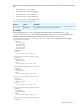
If a Trusted Platform Module (TPM) is installed and enabled the load command must include the
'-TPM_force' option after the URL. Otherwise the command will fail.
IMPORTANT: If a TPM is enabled, then upgrading without performing the proper OS encryption
procedure will result in loss of access to your data. If you do not have your recovery key or have
not suspended BitLocker do not flash iLO.
Non-iLO firmware commands
Non-iLO firmware commands support system firmware updates, available at:
/system1/swid<N>
Where <N> is either a number or a wildcard (*). Use a wildcard to show every firmware version
installed on the system (including iLO) and identify the software ID number of the firmware you
want to load.
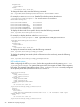
To display (show) information about the firmware entities installed on the system:
</system1>hpiLO-> show swid*
status=0
status_tag=COMMAND COMPLETED
Mon Aug 12 16:13:54 2013
/system1/swid1
Targets
Properties
name=HP ProLiant System ROM
VersionString=09/01/2013
oemhp_VersionStrings=09/01/2013
Verbs
cd version exit show load
.
.
.
When loading non-iLO firmware, the system may need to be manually reset for the changes to be
applied.
Follow the command format as explained above. For example:
load -source http://192.168.1.1/images/fw/iLO4_100.bin
The following types of firmware files are supported:
• HP ProLiant System ROM
• System Programmable Logic Device
• SL Chassis Firmware
Download these server firmware files at:
http://www.hp.com/support
Eventlog commands
Eventlog commands enable you to display or delete the logs of both the system and iLO 4.
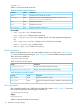
Table 18 (page 56) shows the Eventlog command properties. Eventlog settings are available at:
• /system1/log1—IML
• /map1/log1—iLO event log
Targets
Specific commands 55