
HP iLO 4 Scripting and Command Line Guide

Specify one or more properties on the command line. If multiple properties are on the same
command line, they must be separated by a space.
License commands
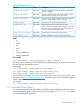
License commands enable you to display and modify the iLO license. Table 10 (page 49) shows
the License command properties. License commands are available at:
/map1/
Targets
None
Commands
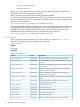
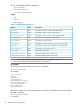
Table 10 License Commands
DescriptionCommand
Changes the current directorycd
Displays license informationshow
Changes the current licenseset
For example
• set /map1 license=1234500000678910000000001
• show /map1 license
Directory commands
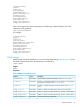
Directory commands enable you to view and modify directory settings. Table 12 (page 50) shows
the Directory command properties. Directory command settings are available at:
/map1/oemhp_dircfg1
Targets
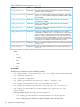
The Directory Command Targets are shown in Table 11 (page 49).
Table 11 Directory Command Targets
DescriptionTarget
Contains a load verb used to load the binary keytab file from a given URL.
The keytab file may be up to 1024 bytes in length.
/map1/oemhp_dircfg1/
oemhp_keytab1
Properties
Specific commands 49