
HP iLO 4 Scripting and Command Line Guide

9 Secure Shell
SSH overview
SSH is a Telnet-like program for logging into and executing commands on a remote machine,
which includes security with authentication, encryption, and data integrity features. The iLO firmware
can support simultaneous access from five SSH clients. After SSH is connected and authenticated,
the command line interface is available.
iLO 4 supports:
• SSH protocol version 2
• PuTTY is a free version of the SSH protocol, and is available for download on the Internet.
When using PuTTY, versions before 0.54 might display 2 line feeds instead of a single line
feed when the ENTER key is pressed. To avoid this issue, and for best results, HP recommends
using version 0.54 or later.
• OpenSSH, which is a free version of the SSH protocol available for download on the Internet.
When upgrading the firmware, a one-time 25-second delay occurs before SSH functionality is
available. During this time, iLO generates the 1024-bit DSA keys. These keys are saved by iLO
for future use. If iLO is reset to factory defaults, the DSA keys are erased and are regenerated on
the next boot.
Supported SSH features
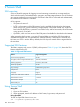
The library supports only version 2 (SSH-2) of the protocol. Table 31 (page 188) shows the SSH
features supported by iLO.
Table 31 Supported SSH Features
Supported AlgorithmFeature
ssh-dsaServer host key algorithms
3des-cbc, aes128-cbcEncryption (same set supported both ways)
hmac-sha1, hmac-md5Hashing algorithms
ssh-dsaPublic key algorithms
Diffie-hellman-group1-sha1Key exchange
NoneCompression
EnglishLanguage
PasswordClient/User authentication method
2 minutesAuthentication timeout
3Authentication attempts
22Default SSH port
Using Secure Shell
Using SSH
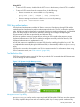
1. Open an SSH window.
2. When prompted, enter the IP address or DNS name, login name, and password.
Using OpenSSH
To start an OpenSSH client in Linux, use:
ssh -l loginname ipaddress/dns name
188 Secure Shell