
HP iLO 4 Scripting and Command Line Guide
</SSO_SERVER>
</GET_SSO_SETTINGS>
MOD_SSO_SETTINGS
The MOD_SSO_SETTINGS command is used to modify the HP SSO settings for iLO 4. For this
command to parse correctly, the MOD_SSO_SETTINGS command must appear within a SSO_INFO
command block, and SSO_INFO MODE must be set to write. The user must have the Configure
iLO Settings privilege to execute this command.
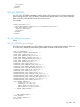
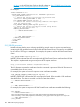
For example:
<RIBCL VERSION="2.0">
<LOGIN USER_LOGIN="Administrator" PASSWORD="password">
<SSO_INFO MODE="write">
<MOD_SSO_SETTINGS>
<!-- Specify the desired trust mode Options: DISABLED(default),
CERTIFICATE (recommended), NAME, or ALL -->
<TRUST_MODE="CERTIFICATE" />
<!-- Specify the privileges assigned to the user role -->
<USER_ROLE LOGIN_PRIV="Y" />
<USER_ROLE REMOTE_CONS_PRIV="N" />
<USER_ROLE RESET_SERVER_PRIV="N" />
<USER_ROLE VIRTUAL_MEDIA_PRIV="N" />
<USER_ROLE CONFIG_ILO_PRIV="N" />
<USER_ROLE ADMIN_PRIV="N" />
<!-- Specify the privileges assigned to the operator role -->
<OPERATOR_ROLE LOGIN_PRIV="Y" />
<OPERATOR_ROLE REMOTE_CONS_PRIV="Y" />
<OPERATOR_ROLE RESET_SERVER_PRIV="Y" />
<OPERATOR_ROLE VIRTUAL_MEDIA_PRIV="Y" />
<OPERATOR_ROLE CONFIG_ILO_PRIV="N" />
<OPERATOR_ROLE ADMIN_PRIV="N" />
<!-- Specify the privileges assigned to the administrator role -->
<ADMINISTRATOR_ROLE LOGIN_PRIV="Y" />
<ADMINISTRATOR_ROLE REMOTE_CONS_PRIV="Y" />
<ADMINISTRATOR_ROLE RESET_SERVER_PRIV="Y" />
<ADMINISTRATOR_ROLE VIRTUAL_MEDIA_PRIV="Y" />
<ADMINISTRATOR_ROLE CONFIG_ILO_PRIV="Y" />
<ADMINISTRATOR_ROLE ADMIN_PRIV="Y" />
<ADMINISTRATOR_ROLE ADMIN_PRIV="Y" />
</MOD_SSO_SETTINGS>
</SSO_INFO>
</LOGIN>
</RIBCL>
MOD_SSO_SETTINGS parameters
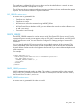
TRUST_MODE sets the Single Sign-On trust mode. The current setting is unchanged if this setting
is omitted from the script. Accepted values are:
• Disabled—Disables HP SSO on this processor.
• Certificate—Accepts only SSO requests authenticated using a certificate.
• Name—Trusts SSO requests from the named HP SIM Server.
• All—Accepts any SSO request from the network.
Role names are used to associate iLO privileges. The specified privileges are set accordingly for
that role, and a privilege that is omitted is unchanged. Enable a privilege for the role using the
argument Y and disable the privilege for the role using the argument N.
184 RIBCL XML Scripting Language