
HP iLO 4 Scripting and Command Line Guide
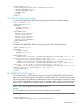
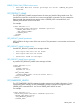
<GET_SERVER_FQDN />
<GET_SMH_FQDN />
</SERVER_INFO>
</LOGIN>
</RIBCL>
GET_SERVER_FQDN/GET_SMH_FQDN parameters
None
GET_SERVER_FQDN/GET_SMH_FQDN return messages
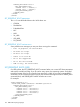
A typical response for these commands might include the following:
<?xml version="1.0"?>
<RIBCL VERSION="2.23">
<RESPONSE
STATUS="0x0000"
MESSAGE='No error'
/>
<SERVER_FQDN VALUE="server.example.com" />
</RIBCL>
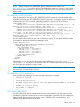
<?xml version="1.0"?>
<RIBCL VERSION="2.23">
<RESPONSE
STATUS="0x0000"
MESSAGE='No error'
/>
<SMH_FQDN VALUE="192.168.2.153" />
</RIBCL>
SERVER_FQDN/SMH_FQDN
The commands SERVER_FQDN and SMH_FQDN set the fully qualified domain names for the server
and the System Management Homepage. IP addresses are also accepted. This allows you to place
the system management homepage at a separate FQDN or IP address from the server. You must
have the Configure iLO Settings privilege to change this attribute using the scripting interface. The
SERVER_INFO section must be set to WRITE mode or an error is returned.
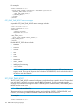
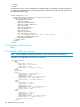
For example:
<RIBCL VERSION="2.0">
<LOGIN USER_LOGIN="adminname" PASSWORD="password">
<SERVER_INFO MODE="write">
<SERVER_FQDN value="server.example.com" />
<SMH_FQDN value="192.168.2.153" />
</SERVER_INFO>
</LOGIN>
</RIBCL>
SERVER_FQDN/SMH_FQDN parameters
SERVER_FQDN—Value must be the FQDN or IP address of the host server.
SMH_FQDN—Value must be the FQDN or IP address of the server hosting the SMH.
SERVER_FQDN/SMH_FQDN return messages
If the attributes are successfully set, no specific messages return.
158 RIBCL XML Scripting Language