
HP iLO 4 Scripting and Command Line Guide
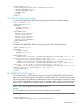
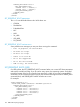
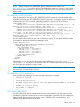
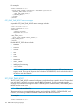
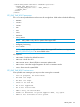
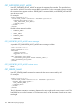
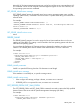
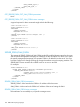
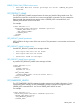
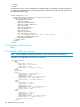

<LOGIN USER_LOGIN="adminname" PASSWORD="password">
<SERVER_INFO MODE="write">
<SET_ONE_TIME_BOOT value = "UEFI_SHELL"/>
</SERVER_INFO>
</LOGIN>
</RIBCL>
SET_ONE_TIME_BOOT parameters
The value sets a specified device as the source for a single boot. Valid values include the following:
• NORMAL
• FLOPPY
• CDROM
• HDD
• USB
• RBSU
• NETWORK
• UEFI_SHELL
NOTE: UEFI_SHELL is only valid on systems that support UEFI.
• Intelligent_Provisioning
• Boot<XXXX>
NOTE: Boot<XXXX> is only valid on systems that support UEFI and are not in Legacy mode.
Use GET_PERSISTENT_BOOT to see available values.
iLO 4 options:
• EMB-MENU—Displays the default boot menu
• EMB-ACU—Boots into ACU
• EMB-HPSUM-AUTO—Boots HPSUM in automatic update mode
• EMB-DIAGS—Launches Insight Diagnostics for Linux in interactive mode
• RBSU—Boots into the system RBSU.
SET_ONE_TIME_BOOT runtime errors
Some possible error messages you may see when running this command:
• Post in progress, EV unavailable.
• EV name too large.
• EV data too large.
• There is no such EV.
• EV is not supported.
• EV is not initialized.
• ROM is busy, EV unavailable.
• Unable to determine if system supports UEFI, try again.
• UEFI is not available on this system.
SERVER_INFO 155