
HP iLO 4 Scripting and Command Line Guide
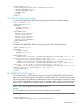
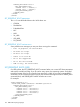
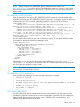
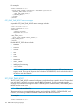

NOTE: Before using the SET_PERSISTENT_BOOT command in UEFI mode, use
GET_PERSISTENT_BOOT to retrieve the list of available boot selections. A server in UEFI mode
does not have unique selections, as opposed to a non-UEFI server, or a UEFI server running in
legacy mode.
SET_PERSISTENT_BOOT parameters
Base the parameters sent with the SET_PERSISTENT_BOOT command on the BootXXXX values
available returned by the GET_PERSISTENT_BOOT command. For example, assume the following
is returned from the GET command, indicating Boot0009 is the primary boot selection:
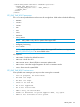
<PERSISTENT_BOOT>
<DEVICE value="Boot0009" DESCRIPTION="Embedded FlexibleLOM 1 Port 1 : HP
Ethernet 1Gb 4-port 331FLR Adapter - NIC (IPv4) "/>
<DEVICE value="Boot000A" DESCRIPTION="Front USB 1 : Imation Nano Pro"/>
<DEVICE value="Boot000D" DESCRIPTION="Windows Boot Manager"/>
<DEVICE value="Boot0007" DESCRIPTION="Embedded SAS : Smart Array P830i
Controller - 68 GB, RAID 0 Logical Drive(Target:0, Lun:0)"/>
<DEVICE value="Boot0008" DESCRIPTION="Embedded FlexibleLOM 1 Port 1 : HP
Ethernet 1Gb 4-port 331FLR Adapter - NIC (IPv6) "/>
</PERSISTENT_BOOT>
The UEFI boot order is based on the order of the device values. To change the UEFI boot order,
for example so that the Windows Boot Manager is first:
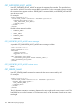
<RIBCL VERSION="2.0">
<LOGIN USER_LOGIN="adminname" PASSWORD="password">
<SERVER_INFO MODE="write">
<SET_PERSISTENT_BOOT>
<DEVICE value = "Boot000D"/>
<DEVICE value = "Boot0009"/>
<DEVICE value = "Boot000A"/>
<DEVICE value = "Boot0007"/>
</SET_PERSISTENT_BOOT>
</SERVER_INFO>
</LOGIN>
</RIBCL>
Alternatively, you can list only the device value that should be first (<DEVICE value =
"Boot000D" />). Any devices not specified in the SET command are moved to the end of the
list, just as they are handled in Legacy mode.
NOTE: The DEVICE values are case sensitive, and must be entered exactly as they are shown in
the return from GET_PERSISTENT_BOOT.
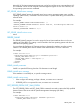
SET_PERSISTENT_BOOT runtime errors
Some possible error messages you may see when running this command:
• DEVICE is invalid.
• Invalid device choice.
• No UEFI Target boot device with the specified BootXXXX is available
• Unable to allocate memory.
• Boot mode is unknown.
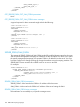
GET_ONE_TIME_BOOT
The GET_ONE_TIME_BOOT command retrieves the current setting for the one time boot. The
specified user must have a valid iLO account to execute RIBCL commands. For this command to
parse correctly, the command must appear within a SERVER_INFO command block, and
SERVER_INFO MODE must be set to read.
SERVER_INFO 153