
HP iLO 4 Scripting and Command Line Guide
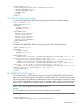
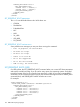
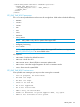
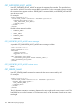
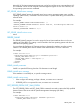
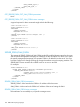
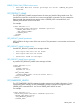
<SERVER_INFO MODE="write">
<SET_PERSISTENT_BOOT>
<DEVICE value = "FLOPPY"/>
<DEVICE value = "CDROM"/>
</SET_PERSISTENT_BOOT>
</SERVER_INFO>
</LOGIN>
</RIBCL>
SET_PERSISTENT_BOOT parameters
The value sets the default boot order. Valid values are:
• CDROM
• FlexibleLOM
• EmbeddedLOM
• NIC
• HDD
• SA_HDD
• USB_HDD
• PCI_DEVICE
SET_PERSISTENT_BOOT runtime errors
Some possible error messages you may see when running this command:
• Post in progress, EV unavailable.
• EV name too large.
• EV data too large.
• There is no such EV.
• EV is not supported.
• EV is not initialized.
• ROM is busy, EV unavailable.
SET_PERSISTENT_BOOT (UEFI)
On UEFI systems, the SET_PERSISTENT_BOOT command takes one or more UEFI boot parameters
and sets the normal boot order. If you do not list every option, the remaining options are shifted
toward the bottom of the list. The specified user must have a valid iLO account to execute RIBCL
commands. For this command to parse correctly, the command must appear within a SERVER_INFO
command block, and SERVER_INFO MODE must be set to write.
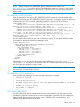
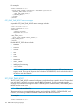
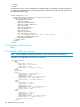
For example:
<RIBCL VERSION="2.0">
<LOGIN USER_LOGIN="adminname" PASSWORD="password">
<SERVER_INFO MODE="write">
<SET_PERSISTENT_BOOT>
<DEVICE value = "Boot0008"/>
<DEVICE value = "Boot0009"/>
<DEVICE value = "Boot000A"/>
<DEVICE value = "Boot000D"/>
</SET_PERSISTENT_BOOT>
</SERVER_INFO>
</LOGIN>
</RIBCL>
152 RIBCL XML Scripting Language