
HP iLO 4 Scripting and Command Line Guide
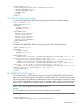
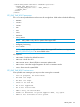
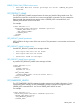
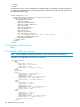

<RIBCL VERSION="2.0">
<LOGIN USER_LOGIN="adminname" PASSWORD="password">
<SERVER_INFO MODE="read">
<GET_PERSISTENT_BOOT/>
</SERVER_INFO>
</LOGIN>
</RIBCL>
GET_PERSISTENT_BOOT return messages
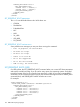
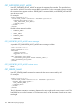
A possible GET_PERSISTENT_BOOT return message when LEGACY is enabled includes:
<?xml version="1.0"?>
<RIBCL VERSION="2.23">
<RESPONSE
STATUS="0x0000"
MESSAGE='No error'
/>
<PERSISTENT_BOOT>
<DEVICE value="CDROM"/>
<DEVICE value="HDD"/>
<DEVICE value="FLOPPY"/>
<DEVICE value="USB"/>
<DEVICE value="NETWORK"/>
</PERSISTENT_BOOT>
</RIBCL>
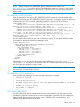
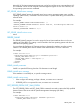
A possible GET_PERSISTENT_BOOT return message when UEFI is enabled includes:
<RIBCL VERSION="2.23">
<RESPONSE
STATUS="0x0000"
MESSAGE='No error'
/>
<PERSISTENT_BOOT>
<DEVICE value="Boot0009" DESCRIPTION="Embedded FlexibleLOM 1 Port 1 : HP
Ethernet 1Gb 4-port 331FLR Adapter - NIC (IPv4) "/>
<DEVICE value="Boot000A" DESCRIPTION="Front USB 1 : Imation Nano Pro"/>
<DEVICE value="Boot000D" DESCRIPTION="Windows Boot Manager"/>
<DEVICE value="Boot0007" DESCRIPTION="Embedded SAS : Smart Array P830i
Controller - 68 GB, RAID 0 Logical Drive(Target:0, Lun:0)"/>
<DEVICE value="Boot0008" DESCRIPTION="Embedded FlexibleLOM 1 Port 1 : HP
Ethernet 1Gb 4-port 331FLR Adapter - NIC (IPv6) "/>
</PERSISTENT_BOOT>
</RIBCL>
SET_PERSISTENT_BOOT (Legacy)
On non-UEFI systems, or UEFI systems in legacy mode, the SET_PERSISTENT_BOOT command
takes one or more boot parameters and sets the normal boot order. If you do not list every option,
the remaining options are shifted toward the bottom of the list. The specified user must have a valid
iLO account to execute RIBCL commands. For this command to parse correctly, the command must
appear within a SERVER_INFO command block, and SERVER_INFO MODE must be set to write.
NOTE: This code modifies EVs. The one time boot EV is:
CQTBT1.
This was modified to set the one-time boot and to display the current status.
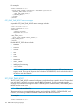
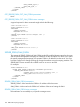
For example:
<RIBCL VERSION="2.0">
<LOGIN USER_LOGIN="adminname" PASSWORD="password">
SERVER_INFO 151