
HP iLO 4 Scripting and Command Line Guide
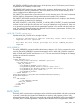
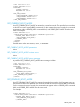
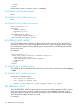
</LOGIN>
</RIBCL>
Possible return values are LEGACY, UEFI, or UNKNOWN.
GET_PENDING_BOOT_MODE parameters
None
GET_PENDING_BOOT_MODE runtime errors
None
GET_PENDING_BOOT_MODE return messages
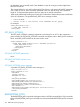
<RIBCL VERSION="2.23">
<RESPONSE
STATUS="0x0000"
MESSAGE='No error'
/>
<GET_PENDING_BOOT_MODE>
<BOOT_MODE VALUE="LEGACY"/>
</GET_PENDING_BOOT_MODE></RIBCL>
SET_PENDING_BOOT_MODE
Use SET_PENDING_BOOT_MODE to set the mode for the next server boot. The specified user
must have a valid iLO account to execute RIBCL commands. For this command to parse correctly,
the command must appear within a SERVER_INFO command block, and SERVER_INFO MODE
must be set to write.
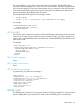
For example:
<RIBCL VERSION="2.0">
<LOGIN USER_LOGIN="adminname" PASSWORD="password">
<SERVER_INFO MODE="write">
<SET_PENDING_BOOT_MODE VALUE="LEGACY"/>
</SERVER_INFO>
</LOGIN>
</RIBCL>
SET_PENDING_BOOT_MODE parameters
SET_PENDING_BOOT_MODE sets the mode for the next server boot. Valid values include LEGACY
or UEFI.
SET_PENDING_BOOT_MODE runtime errors
Possible error messages include:
• This system is UEFI only.
• This system is Legacy only.
• Unable to determine if system supports UEFI, try again.
GET_PERSISTENT_BOOT
The GET_PERSISTENT_BOOT command returns the current boot order, regardless of UEFI or Legacy
mode. The specified user must have a valid iLO account to execute RIBCL commands. For this
command to parse correctly, the command must appear within a SERVER_INFO command block,
and SERVER_INFO MODE must be set to read.
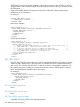
For example:
150 RIBCL XML Scripting Language