
HP iLO 4 Scripting and Command Line Guide
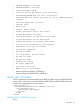
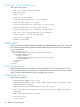
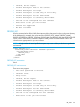


• PROFILE_DESCRIPTION is too long.
• PROFILE_SCHEMA is too long.
• There are missing parameters in the xml script.
• Need a value for the PROFILE_URL tag.
• Need a value for the PROFILE_DESC_NAME tag.
• Incorrect url.
• Failed to connect to the url.
• User does NOT have correct privilege for action. CONFIG_ILO_PRIV
required.
• The value specified is invalid.
• Internal error.
• Retry later.
• Invalid, do not repeat.
• Profile descriptor name is not correct.
• Profile descriptor too large.
• Profile Descriptor is read only or write only.
• Profile descriptor has not been found.
• Profile descriptor is currently unavailable.
• The iLO is not configured for this command.
• Blob Store is not yet initialized.
• Feature not supported
• No data available
FIPS_ENABLE
Use this script to enable the Federal Information Processing Standard Enforce AES/3DES Encryption
setting, in iLO 4 v1.20 or later. Use HPQLOCFG.EXE version 1.00 or later with this command.
Replace USER_LOGIN and PASSWORD values with values that are appropriate for your
environment.
WARNING! All active connections (including Remote Console and Virtual Media sessions) to the
iLO device are dropped immediately when this script executes.
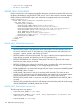
<RIBCL VERSION="2.0">
<LOGIN USER_LOGIN="adminname" PASSWORD="password">
<RIB_INFO MODE="write">
<FIPS_ENABLE/>
</RIB_INFO>
</LOGIN>
</RIBCL>
Disabling FIPS:
To disable FIPS, use the FACTORY_DEFAULTS command.
FIPS_ENABLE parameters
None
RIB_INFO 135