
HP iLO 4 Scripting and Command Line Guide


Supported hot keys
The Program Remote Console Hot Keys page allows you to define up to six different sets of hot
keys for use during a Remote Console session. Each hot key represents a combination of up to five
different keys which are sent to the host machine whenever the hot key is pressed during a Remote
Console session. The selected key combination (all keys pressed at the same time) are transmitted
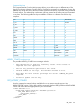
in its place. The following table lists keys available to combine in a Remote Console hot key
sequence.
BACKSPACEsd–F1ESC
SYS RQte(F2L_ALT
1uf)F3R_ALT
2vg*F4L_SHIFT
3wh+F5R_SHIFT
4xI:F6INS
5yj<F7DEL
6zk>F8HOME
7;l=F9END
8‘m[F10PG UP
9L_CTRLn]F11PG DN
0R_CTRLo\F12ENTER
NONENUM PLUSpaSPACETAB
L_GUINUM MINUSqb/BREAK
R_GUISCRL LCKrc.COMMA
HOTKEY_CONFIG runtime errors
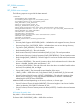
The possible HOTKEY_CONFIG error messages include:
• RIB information is open for read-only access. Write access is
required for this operation.
• The hot key parameter specified is not valid.
• Invalid number of hot keys. The maximum allowed is five.
• User does not have correct privilege for action. CONFIG_ILO_PRIV
required.
• Failed to update the hot key.
GET_HOTKEY_CONFIG
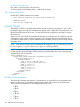
Use this command to retrieve hotkeys available for use in remote console sessions. Use
HPQLOCFG.EXE version 1.00 or later with this command. Replace USER_LOGIN and PASSWORD
values with values that are appropriate for your environment.
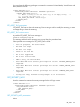
<RIBCL VERSION="2.0">
<LOGIN USER_LOGIN="adminname" PASSWORD="password">
<RIB_INFO MODE="read">
<GET_HOTKEY_CONFIG/>
</RIB_INFO>
</LOGIN>
</RIBCL>
RIB_INFO 129