
HP iLO 4 Scripting and Command Line Guide
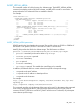
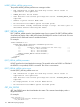
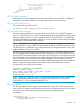
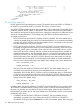
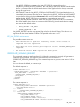
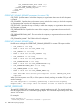
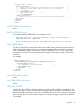
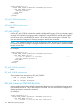
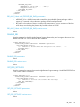
<RIB_INFO MODE = "write">
<IMPORT_CERTIFICATE>
<!-- Replace the following text and comments with the certificate -->
<!-- INCLUDE the full header and full footer of the certificate -->
<!-- For example: -->
-----BEGIN CERTIFICATE-----
<!-- Ceritificate Data -->
-----END CERTIFICATE-----
</IMPORT_CERTIFICATE>
<!-- The iLO will be reset after the certificate has been imported. -->
<RESET_RIB/>
</RIB_INFO>
</LOGIN>
</RIBCL>
IMPORT_CERTIFICATE parameters
None
IMPORT_CERTIFICATE errors
The possible IMPORT_CERTIFICATE error messages include:
• RIB information is open for read-only access. Write access is
required for this operation.
• Error reading certificate: The imported certificate is invalid.
AHS_CLEAR_DATA
The AHS_CLEAR_DATA command clears the Active Health System information from the AHS log.
For this command to parse correctly, the command must appear within a RIB_INFO command
block, and RIB_INFO MODE must be set to write. Use HPQLOCFG version 1.00 or later when
executing this command. The user must have the Configure iLO Settings privilege to execute this
command.
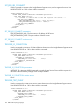
For example:
<RIBCL VERSION="2.0">
<LOGIN USER_LOGIN="adminname" PASSWORD="password">
<RIB_INFO MODE="write">
<!-- Command to clear AHS data. -->
<AHS_CLEAR_DATA/>
</RIB_INFO>
</LOGIN>
</RIBCL>
AHS_CLEAR_DATA parameters
None
AHS_CLEAR_DATA runtime errors
None
GET_AHS_STATUS
Use the GET_AHS_STATUS command to determine whether AHS is enabled or disabled. For this
command to parse correctly, the command must appear within a RIB_INFO command block, and
RIB_INFO MODE can be set to read or write. Use HPQLOCFG version 1.00 or later when executing
this command. The user must have the Configure iLO Settings privilege to execute this command.
For example:
RIB_INFO 117