
HP iLO 4 Scripting and Command Line Guide
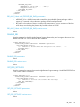
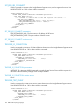
INSERT_VIRTUAL_MEDIA runtime errors
The possible INSERT_VIRTUAL_MEDIA error messages include:
• RIB information is open for read-only access. Write access is
required for this operation.
• IMAGE_URL must not be blank.
• User does not have correct privilege for action. VIRTUAL_MEDIA_PRIV
required.
• Unable to parse Virtual Media URL
• An invalid Virtual Media option has been given.
• Virtual Media already connected through a script. You must eject or
disconnect before inserting new media.
EJECT_VIRTUAL_MEDIA
EJECT_VIRTUAL_MEDIA ejects the Virtual Media image if one is inserted. The EJECT_VIRTUAL_MEDIA
command must display within a RIB_INFO element and RIB_INFO must be in write mode. You must
purchase the iLO Advanced license to enable this feature.
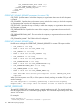
For example:
<RIBCL VERSION="2.0">
<LOGIN USER_LOGIN="adminname" PASSWORD="password">
<RIB_INFO MODE="write">
<!-- Firmware support information for next tag: -->
<!-- iLO 4 - All versions. -->
<!-- iLO 3 - All versions. -->
<!-- iLO 2 - All versions. -->
<EJECT_VIRTUAL_MEDIA DEVICE="FLOPPY"/>
</RIB_INFO>
</LOGIN>
</RIBCL>
EJECT_VIRTUAL_MEDIA parameters
DEVICE specifies the Virtual Media device target. The possible values are FLOPPY or CDROM. If
the DEVICE is not specified, FLOPPY is assumed. This value is case-sensitive.
EJECT_VIRTUAL_MEDIA runtime errors
Possible EJECT_VIRTUAL_MEDIA errors are:
• RIB information is open for read-only access. Write access is
required for this operation.
• User does not have correct privilege for action. VIRTUAL_MEDIA_PRIV
required.
• No image present in the Virtual Media drive.
• An invalid Virtual Media option has been given.
GET_VM_STATUS
GET_VM_STATUS returns the Virtual Media drive status. This command must display within a
RIB_INFO element.
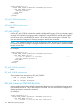
For example:
<RIBCL VERSION="2.0">
<LOGIN USER_LOGIN="adminname" PASSWORD="password">
<RIB_INFO MODE="read">
112 RIBCL XML Scripting Language