
Integrated Lights-Out 3 Virtual Serial Port configuration and operation HOWTO, 6th edition
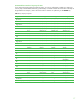
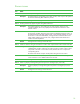
Table Of Contents
- Introduction
- Conceptual overview
- Security
- Configuration
- Operation
- Known issues
- For more information
- Call to action

17
Command line interface keymap for iLO
If your terminal program supports custom key maps, you can use information in Table 4 to create your
own key map. The backslash character (\) followed by a numeral indicates the octal value of the byte to
be generated. For example, \033 is the octal code for character 27 (decimal), or the ESCAPE key.
Table 4. Key map key sequences
Key Normal Shift + key Ctrl + key Alt + key
Up Arrow
\033[A \033[3\033[A \033[2\033[A \033[1\033[A
Down Arrow
\033[B \033[3\033[B \033[2\033[B \033[1\033[B
Right Arrow
\033[C \033[3\033[C \033[2\033[C \033[1\033[C
Left Arrow
\033[D \033[3\033[D \033[2\033[D \033[1\033[D
Insert
\033[L \033[3\033[L \033[2\033[L \033[1\033[L
Delete
\177 \033[3\177 \033[2\177 \033[1\177
Home
\033[H \033[3\033[H \033[2\033[H \033[1\033[H
End
\033[F \033[3\033[F \033[2\033[F \033[1\033[F
Page Up
\033[I \033[3\033[I \033[2\033[I \033[1\033[I
Page Down
\033[G \033[3\033[G \033[2\033[G \033[1\033[G
F1
\033[M \033[Y \033[k \033[w
F2
\033[N \033[Z \033[l \033[x
F3
\033[O \033[a \033[m \033[y
F4
\033[P \033[b \033[n \033[z
F5
\033[Q \033[c \033[o \033[@
F6
\033[R \033[d \033[p \033[[
F7
\033[S \033[e \033[q \033[\
(backslash)
F8
\033[T \033[f \033[r \033[]
F9
\033[U \033[g \033[s \033[^ (caret)
F10
\033[V \033[h \033[t \033[_ (underbar)
F11
\033[W \033[i \033[u \033[` (backtick)
F12
\033[X \033[j \033[v \033[‘ (quote)
Enter
\015 \033[3\015 \012 \033[1\015
Backspace
\010 \033[3\010 \177 \033[1\010
Ctrl-Alt-Del
\033[2\033[\177 Not applicable Not applicable Not applicable
Refresh Display
\033[~ Not applicable Not applicable Not applicable