
Integrated Lights-Out 3 Virtual Serial Port configuration and operation HOWTO, 6th edition
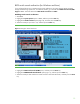
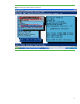
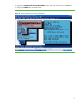
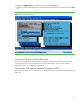
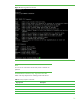
Table Of Contents
- Introduction
- Conceptual overview
- Security
- Configuration
- Operation
- Known issues
- For more information
- Call to action
12
BIOS serial console redirection (for Windows and Linux)
If you configured the server to use BIOS serial console redirection, the system presents POST messages
through the VSP during system boot. To enable this feature, go to the tab called BIOS Serial Console/EMS
Support in RBSU. Select this tab and set BIOS Serial Console Port to COM1:.
Enabling serial console redirection
1. Start RBSU.
2. Highlight the System Options option in RBSU, and then press the Enter key.
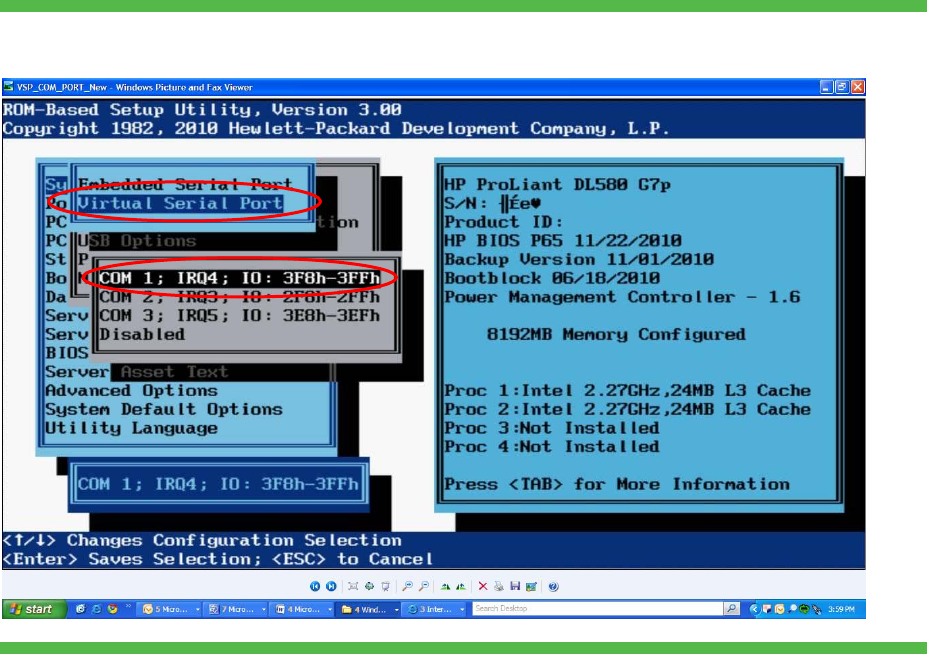
3. Highlight the Virtual Serial Port option (Figure 6), and then press the Enter key.
4. Select the COM port you want to use, and then press the Enter key.
Figure 6. Setting the Virtual Serial Port
5. Highlight the BIOS Serial Console & EMS option, and then press the Enter key.
6. Highlight the BIOS Serial Console Port option (Figure 7), and then press the Enter key.
7. Select the COM port that matches the Virtual Serial Port value selected earlier, and then press the Enter
key.