
HP iLO 3 Scripting and Command Line Guide
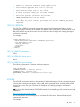
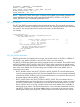
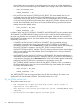

• Unable to read the firmware image update file.
• The firmware upgrade file size is too big.
• The firmware image file is not valid.
• A valid firmware image has not been loaded.
• The flash process could not be started.
• IMAGE_LOCATION must not be blank.
• User does not have correct privilege for action. CONFIG_ILO_PRIV
required.
GET_FW_VERSION
The GET_FW_VERSION command requests the respective iLO firmware information. For this
command to parse correctly, the command must appear within a RIB_INFO command block, and
RIB_INFO MODE must be set to read. The user must have the Configure iLO Settings privilege to
execute this command.
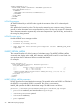
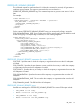
For example:
<RIBCL VERSION="2.0">
<LOGIN USER_LOGIN="adminname" PASSWORD="password">
<RIB_INFO MODE="read">
<GET_FW_VERSION/>
</RIB_INFO>
</LOGIN>
</RIBCL>
GET_FW_VERSION parameters
None
GET_FW_VERSION runtime errors
None
GET_FW_VERSION return messages
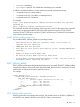
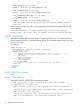
The following information is returned within the response:
<GET_FW_VERSION
FIRMWARE_VERSION = firmware version
FIRMWARE_DATE = firmware date
MANAGEMENT_PROCESSOR = management processor type
/>
LICENSE
The LICENSE command activates or deactivates iLO advanced features. For this command to parse
correctly, the command must appear within a RIB_INFO command block, and RIB_INFO MODE
must be set to write. The user must have the Configure iLO Settings privilege to execute this
command.
To see a video demonstration of LICENSE command, see Installing an iLO License Key through
scripting at:
http://www.hp.com/go/ilo/videos
You do not have to use a licensing key on a ProLiant BL Class server. Advanced features are
automatically activated.
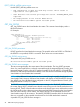
For example:
RIB_INFO 91