
HP iLO 3 Scripting and Command Line Guide
addresses are configured, this setting determines the order of use for the primary addresses, then
the secondary addresses, and finally the tertiary addresses.
DHCPV6_STATELESS_ENABLE and DHCPV6_STATEFUL_ENABLE modifies the operational mode
of DHCPv6. The values for both of these parameters can be either Y (enabled) or N (disabled).
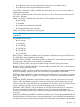
• DHCPV6_STATEFUL_ENABLE is analagous to DHCPv4, and enables the configuration of a
node address and additional parameters such as NTP server location and time zone.
• DHCPV6_STATELESS_ENABLE enables the configuration of parameters such as NTP server
location but does not provide for the configuration of a node address. This mode may be used
with IPv6 Stateless Address Auto-Configuration (SLAAC) to provide configuration data that
cannot otherwise be provided.
DHCPV6_STATELESS_ENABLE and DHCPV6_STATEFUL_ENABLE work together in a DHCPv6
environment. In most environments, if DHCPV6_STATEFULL_ENABLE is enabled (which provides
a subset of information available via DHCPV6_STATEFUL_ENABLE) this implies that
DHCPV6_STATELESS_ENABLE should also be enabled. Value must be either Y (enabled) or N
(disabled).
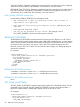
DHCPV6_RAPID_COMMIT is used when DHCPV6_STATEFUL_ENABLE is enabled. It provides a
reduction in the amount of DHCPv6 network traffic needed to assign addresses, but should not be
used if more than one DHCPv6 server is present in the network for the purpose of assigning
addresses. DHCPv6 database errors may result if more than one server can assign iLO an IPv6
address and Rapid Commit mode is enabled. Value must be either Y (enabled) or N (disabled).
DHCPV6_SNTP_SETTINGS specifies whether DHCPv6 Stateless-assigned NTP server addresses
are used or whether the user enters that information manually. Value must be either Y (enabled)
or N (disabled).
DHCPV6_DNS_SERVER specifies whether the DHCPv6 Stateless-assigned DNS server adresses
are used. Value must be either Y (enabled) or N (disabled).
GET_GLOBAL_SETTINGS
The GET_GLOBAL_SETTINGS command requests the respective iLO global settings. For this
command to parse correctly, the command must appear within a RIB_INFO command block, and
RIB_INFO MODE can be set to read or write.
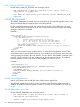
For example:
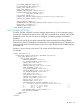
<RIBCL VERSION="2.0">
<LOGIN USER_LOGIN="adminname" PASSWORD="password">
<RIB_INFO MODE="read">
<GET_GLOBAL_SETTINGS/>
</RIB_INFO>
</LOGIN>
</RIBCL>
GET_GLOBAL_SETTINGS parameters
None
GET_GLOBAL_SETTINGS runtime errors
None
GET_GLOBAL_SETTINGS return messages
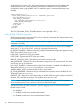
A possible GET_GLOBAL_SETTINGS return message is as follows:
<GET_GLOBAL_SETTINGS>
<SESSION_TIMEOUT VALUE="30"/>
84 RIBCL XML Scripting Language