
HP iLO 3 Scripting and Command Line Guide
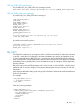
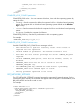
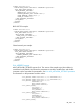
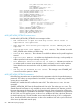
ADDR_STATUS="ACTIVE"/>
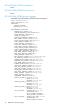
<IPV6_ADDRESS VALUE="fe80::1ec1:deff:fe17:b390"
PREFIXLEN="64"
ADDR_SOURCE="SLAAC"
ADDR_STATUS="ACTIVE"/>
<IPV6_ADDRESS VALUE="2001:2:1:0:1ec1:deff:fe17:b390"
PREFIXLEN="64"
ADDR_SOURCE="SLAAC"
ADDR_STATUS="ACTIVE"/>
<IPV6_STATIC_ROUTE_1
IPV6_DEST="2001:2:2::20"
PREFIXLEN="64"
IPV6_GATEWAY="fe80::1:2:3"
ADDR_STATUS="ACTIVE"/>
<IPV6_STATIC_ROUTE_2
IPV6_DEST="::"
PREFIXLEN="0"
IPV6_GATEWAY="::"
ADDR_STATUS="INACTIVE"/>
<IPV6_STATIC_ROUTE_3
IPV6_DEST="2001:1001:2002:3003::"
PREFIXLEN="64"
IPV6_GATEWAY="2001:db8:1::40"
ADDR_STATUS="ACTIVE"/>
<IPV6_PRIM_DNS_SERVER VALUE="2001:1:2::5"/>
<IPV6_SEC_DNS_SERVER VALUE="2001:1:2::6"/>
<IPV6_TER_DNS_SERVER VALUE="::"/>
<IPV6_DEFAULT_GATEWAY VALUE="fe80::21c:c4ff:fe18:9cbd"/>
<IPV6_PREFERRED_PROTOCOL VALUE="Y"/>
<IPV6_ADDR_AUTOCFG VALUE="Y"/>
<IPV6_REG_DDNS_SERVER VALUE="Y"/>
<DHCPV6_STATELESS_ENABLE VALUE="Y"/>
<DHCPV6_STATEFUL_ENABLE VALUE="Y"/>
<DHCPV6_RAPID_COMMIT VALUE="N"/>
<DHCPV6_SNTP_SETTINGS VALUE="Y"/>
<DHCPV6_DNS_SERVER VALUE="Y"/>
</GET_NETWORK_SETTINGS>
</RIBCL>
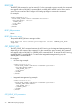
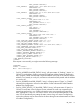
If the request is unsuccessful, you might receive the following message:
<RESPONSE
STATUS = "0x0001"
MSG = "Error Message"/>
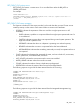
• For IPV6_ADDRESS the ADDR_STATUS=”string”, will report status of “Pending”, “Active”, or
“Failed” for each address. Pending indicates the Duplicate Address Detection (DAD) test is
still in progress, Failed indicates that a duplicate address was found on the network and the
address is not currently in use by iLO, and Active indicates that DAD passed and the address
is in use by iLO.
• For IPV6_ADDRESS the ADDR_SOURCE=”string” will report status of “Static” or “SLAAC”
indicating the configuration source for that address. SLAAC indicates RFC 4862 Stateless
Address Auto Configuration.
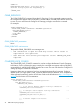
• For IPV6_STATIC_ROUTE_[1:3] the ADDR_STATUS=”string” will report status of “Active” or
“Failed” for each static route configured. Active indicates the route was accepted by the
networking stack and is in use. Failed indicates the route was rejected by the networking
stack, typically this is due to a “No route to source” error for the specified gateway. In this
case, iLO will periodically retry setting the static route as long as it remains configured (a
route to the gateway may be discovered in the future through router advertisements or further
iLO address configuration.)
RIB_INFO 77