
HP iLO 3 Scripting and Command Line Guide
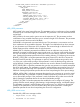
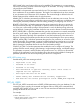
</MOD_USER>
</USER_INFO>
</LOGIN>
</RIBCL>
DEL_SSH_KEY parameters
None
DEL_SSH_KEY runtime errors
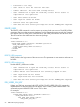
Possible DEL_SSH_KEY runtime errors include:
• User login name must not be blank
• User does not have correct privilege for action. ADMIN_PRIV required.
• Unable to clear the SSH key.
GET_USER
The GET_USER command returns local user information, excluding the password. The USER_LOGIN
parameter must exist in the current user database. For this command to parse correctly, the command
must appear within a USER_INFO command block, and USER_INFO MODE can be in read or
write. The user must have the Administer User Accounts privilege to retrieve other user accounts.
Otherwise, the user can only view their individual account information.
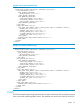
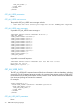
For example:
<RIBCL VERSION="2.0">
<LOGIN USER_LOGIN="adminname" PASSWORD="password">
<USER_INFO MODE="read">
<GET_USER USER_LOGIN="username"/>
</USER_INFO>
</LOGIN>
</RIBCL>
GET_USER parameter
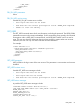
USER_LOGIN is the login name of the user account. This parameter is case sensitive and must not
be blank.
GET_USER runtime errors
Possible GET_USER error messages include:
• User login name must not be blank.
• User login name was not found.
• User does not have correct privilege for action. ADMIN_PRIV required.
GET_USER return messages
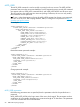
A possible GET_USER return message includes:
<RESPONSE STATUS="0x0000" MSG="No Errors"/>
<GET_USER USER_NAME="Admin User" USER_LOGIN= "username"
ADMIN_PRIV="N"
REMOTE_CONS_PRIV="Y"
RESET_SERVER_PRIV="N"
VIRTUAL_MEDIA_PRIV="N"
CONFIG_ILO_PRIV value ="No"/>
USER_INFO 67