
HP iLO 3 Scripting and Command Line Guide
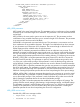
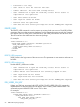
• Password is too long.
• User table is full. No room for new user.
• Cannot add user. The user name already exists.
• User information is open for read-only access. Write access is
required for this operation.
• User name cannot be blank.
• User login ID cannot be blank.
• Boolean value not specified.
• User does not have correct privilege for action. ADMIN_PRIV required.
DELETE_USER
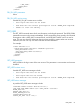
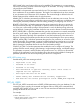
The DELETE_USER command is used to remove an existing local user account. The USER_LOGIN
parameter must exist in the current user database. For this command to parse correctly, the command
must appear within a USER_INFO command block, and USER_INFO MODE must be set to write.
The user must have the Administer User Accounts privilege.
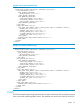
For example:
<RIBCL VERSION="2.0">
<LOGIN USER_LOGIN="adminname" PASSWORD="password">
<USER_INFO MODE="write">
<DELETE_USER USER_LOGIN="username"/>
</USER_INFO>
</LOGIN>
</RIBCL>
DELETE_USER parameter
USER_LOGIN is the login name of the user account. This parameter is case sensitive and must not
be blank.
DELETE_USER runtime errors
Possible DELETE_USER errors include:
• User information is open for read-only access. Write access is
required for this operation.
• Cannot delete user information for currently logged in user.
• User login name was not found.
• User login name must not be blank.
• User does not have correct privilege for action. ADMIN_PRIV required.
DEL_USERS_SSH_KEY
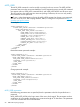
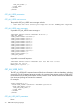
Deletes any SSH keys associated with USER_LOGIN. The DEL_USERS_SSH_KEY command is
implemented as a subcommand and must appear within a MOD_USER command block. This
command requires HPQLOCFG.EXE version 1.00 or later.
For example:
<RIBCL VERSION="2.0">
<LOGIN USER_LOGIN="admin" PASSWORD="admin123">
<USER_INFO MODE="write">
<MOD_USER USER_LOGIN="admin">
<DEL_USERS_SSH_KEY/>
66 RIBCL XML Scripting Language