
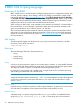
HP iLO 3 Scripting and Command Line Guide



• show /system1/oemhp_power1 oemhp_pwrcap
• set /system1/oemhp_power1 oemhp_pwrcap=0
• show /system1/oemhp_power1 oemhp_power_micro_ver
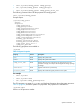
The following command shows all the properties for oemhp_power1:
show /system1/oemhp_power1
Example output:
/system1/oemhp_power1
Targets
Properties
oemhp_powerreg=os
oemhp_pwrcap=0 Watts
oemhp_PresentPower=147 Watts
oemhp_AvgPower=146 Watts
oemhp_MaxPower=180 Watts
oemhp_MinPower=146 Watts
oemhp_powersupplycapacity=750 Watts
oemhp_servermaxpower=361 Watts
oemhp_serverminpower=144 Watts
warning_type=disabled
warning_threshold=750 Watts
warning_duration=240 Minutes
oemhp_power_micro_ver=1.6
oemhp_auto_pwr=OFF
The following properties are available in:
/system1
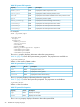
Table 24 System Properties
DescriptionAccessProperty
Displays the system name.Readname
Displays the system serial number.Readnumber
Displays the host server name string. This string can be up to 50
characters in length, and requires the Configure iLO Settings privilege
to change.
Readoemhp_server_name
Appears if the server is powered up.Readenabledstate
Displays the number of logical processors in the system.Readprocessor_number
For example
• show /system1
• show /system1 name
• set /system1 oemhp_powerreg=auto
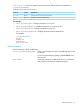
The CPU property is a target of /system1 and displays information about the system processor.
Table 25 (page 58) shows the System CPU properties. The properties are available at:
/system1/cpun
Where n is the processor number.
Specific commands 57