
HP iLO 3 Scripting and Command Line Guide

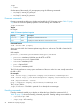

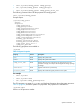

/system1/bootconfig1/bootsource5
Targets
Properties
bootorder=5
Verbs
cd version exit show set
To change the boot order, enter the following command:
set /system1/bootconfig1/bootsource<n> bootorder=<num>.
For example, to move bootsource1 (BootfmCd) to be the primary boot device:
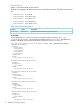
</system1/bootconfig1>hpiLO-> set bootsource1 bootorder=1
Bootorder being set.
bootsource1=BootFmCd bootorder=1
bootsource3=BootFmDisk bootorder=2
bootsource2=BootFmFloppy bootorder=3
bootsource4=BootFmUSBKey bootorder=4
bootsource5=BootFmNetwork bootorder=5
To display the boot order for a specific device, enter the following command:
show /system1/bootconfig1/bootsource<n>
For example, to display the boot order for bootsource1:
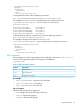
</system1/bootconfig1>hpiLO-> show /system1/bootconfig1/bootsource1
/system1/bootconfig1/bootsource1
Targets
Properties
bootorder=1
Verbs
cd version exit show set
LED commands
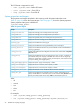
LED commands are used to change the state of the UID light on the server. Table 22 (page 55)
shows the LED command properties. LED settings are available at:
/system1/led1
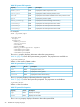
Table 22 LED Command Properties
DescriptionProperty
Turns the LED on.start
Turns the LED off.stop
Displays the LED status.show
For example
• show /system1/led1—Displays current LED status
• start /system1/led1—Turns LED on
• stop /system1/led1—Turns LED off
iLO 3 CLI support
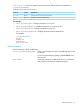
Simple UID CLI commands are supported:
• uid—Displays the current UID state on the server.
• uid on—Turns the UID light on.
• uid off—Turns the UID light off.
Specific commands 55