
HP iLO 3 Scripting and Command Line Guide



Targets
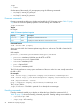
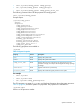
record:1..n
Where n is the total number of records.
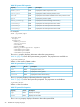
Table 18 Eventlog Command Properties
DescriptionAccessProperty
Displays the record number for the event.readnumber
Displays the severity of the event. Severity levels are informational,
noncritical, critical, or unknown.
readseverity
Displays the event date.readdate
Displays the event time.readtime
Displays a description of the event.readdescription
For example
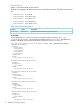
• show /system1/log1—Displays the IML.
• show /map1/log1—Displays the iLO event log.
• show /system1/log1/recordn—Displays record n from the Integrated Management
log.
• show /map1/log1/recordn—Displays record n from the iLO event log.
• delete /system1/log1—Deletes the IML.
• delete /map1/log1—Deletes iLO event log.
Blade commands
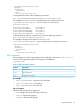
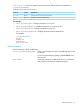
Blade commands enable you to view and modify the values on a c-Class server. Table 19 (page
53) shows the Blade command targets. Table 20 (page 53) shows the Blade command properties.
These values are available at:
/system1/map1/blade1
Table 19 Blade Command Targets
DescriptionTarget
Displays and modifies the blade rack settings./map1/blade1/rack
Displays and modifies the blade enclosure settings./map1/blade1/rack/enclosure
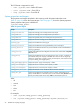
Table 20 Blade Command Properties
DescriptionAccessProperty
Displays the blade bay number.Readbay_number
Displays and modifies if the blade is enabled to automatically power
up.
Readauto_power
For example
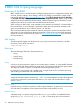
Boot commands
Boot commands enable you to modify the boot order of the system. Table 21 (page 54) shows the
Boot command properties. Boot settings are available at:
/system1/bootconfig1
Targets
Specific commands 53