
HP iLO 3 Scripting and Command Line Guide
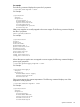
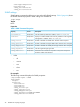
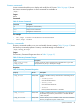
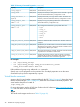
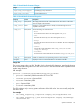
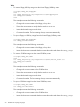

Table 12 Directory Command Properties (continued)
DescriptionAccessProperty
Sets the directory server port.Read/Writeoemhp_ldapport
Displays the LOM object distinguished name. This field is ignored
when the schema-free directory configuration is used.
Read/Writeoemhp_dirdn
Displays the directory user login search context. This field is not
necessary when the schema-free directory configuration is used.
Read/Writeoemhp_usercntxt1, 2 ...
(up to 15)
Displays security group distinguished name. Used within the
schema-free directory configuration only.
Read/Writeoemhp_group(n)_name
where n = 1..6
The privileges associated with a group. Valid values are:Read/Writeoemhp_group(n)_priv
where n = 1..6
• login
• oemhp_rc
• oemhp_power
• oemhp_vm
• config
• admin
Enables or disables Kerberos authentication. Boolean values are
accepted.
Read/Writeoemhp_dir_kerberos_enabled
Specifies the port number used to connect to the domain controller.
The Kerberos port number is 88, but the domain controller can be
configured for a different port number.
Read/Writeoemhp_dir_kerberos_kdc_port
The location of the domain controller. The domain controller location
is specified as an IP address or DNS name.
Read/Writeoemhp_dir_kerberos_kdc_address
Specifies the Kerberos realm for which the domain controller is
configured. By convention, the Kerberos realm name for a given
domain is the domain name converted to uppercase.
Read/Writeoemhp_dir_kerberos_realm
For example
• set /map1/oemhp_dircfg1
• set /map1/oemhp_dircfg1 oemhp_dirauth=default_schema
oemhp_dirsrvaddr=adserv.demo.com
Define additional groups using additional set commands.
Specify one or more properties on the command line. If multiple properties are on the same
command line, they must be separated by a space.
Virtual Media commands
Access to the iLO virtual media is supported through the CLP. Table 13 (page 49) shows the Virtual
Media command targets. Table 14 (page 49) shows the Virtual Media command properties. The
virtual media subsystem is located at:
/map1/oemhp_vm1.
For more information, see the HP iLO User Guide on the HP website at: http://www.hp.com/go/
ilo3 and click More iLO Documentation.
Targets
The virtual media targets are shown in Table 13 (page 49).
48 SMASH CLP Scripting Language