
HP iLO 3 Scripting and Command Line Guide
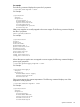

SensorType=Temperature
HealthState=Ok
oemhp_CautionValue=41
oemhp_CriticalValue=45
SNMP settings
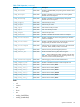
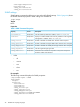
SNMP settings commands enable you to view and modify SNMP settings. Table 9 (page 46) shows
the SNMP command properties. SNMP settings are available at:
/map1/snmp1
Targets
None
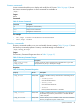
Properties
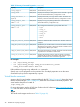
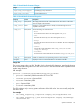
Table 9 SNMP Command Properties
DescriptionAccessProperty
Sets the SNMP trap destination address, where <n> is 1, 2, or 3.Read/Writeaccessinfo<n>
Displays or modifies SNMP read community address for when Agentless
Management is enabled, where <n> is 1, 2, or 3.
Read/Writereadcom<n>
Enables or disables iLO SNMP alerts. Boolean values accepted.Read/Writeoemhp_iloalert
Enables or disables host agent SNMP alerts. Boolean values accepted.Read/Writeoemhp_agentalert
Enables or disables iLO SNMP pass-through. Boolean values accepted.Read/Writeoemhp_snmppassthru
Sets the Insight Manager Agent URL.Read/Writeoemhp_imagenturl
Determines if the LOM device responds to anonymous XML queries.
Enable or disable valid selections.
Read/Writeoemhp_imdatalevel
• Verbs
◦ cd
◦ version
◦ exit
◦ show
◦ set
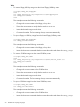
For example
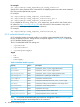
The following command displays the SNMP properties:
</map1/snmp1>hpiLO-> show
/map1/snmp1
Targets
Properties
accessinfo1=0
accessinfo2=0
accessinfo3=0
oemhp_iloalert=yes
oemhp_agentalert=yes
oemhp_snmppassthru=yes
oemhp_imagenturl=SYSTEM_HOSTNAME
oemhp_imdatalevel=enabled
46 SMASH CLP Scripting Language