
HP iLO 3 Scripting and Command Line Guide
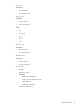
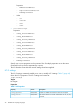

For example
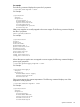
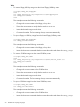
set /map1/config1 oemhp_mapenable=yes oemhp_timeout=30
Specify one or more properties in the command line. If multiple properties are on the same command
line, they must be separated by a space.
For example:
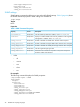
set /map1/config1 oemhp_computer_lock=windows
set /map1/config1 oemhp_computer_lock=custom,l_gui,l
set /map1/config1 oemhp_computer_lock=disabled
For a complete list of oemhp_computer_lock custom keys, see the HP iLO User Guide on the
HP website at: http://www.hp.com/go/ilo3 and click More iLO Documentation. Keys with a
space must have the space replaced with an underscore.
For example:
set /map1/config1 oemhp_computer_lock=custom,SYS_RQ
iLO 3 embedded health settings
iLO 3 embedded health commands enable you to display system embedded health information
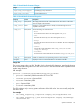
for fans, temperature sensors, voltage sensors, and power supplies. Table 8 (page 44) shows the
iLO 3 Embedded Health properties.
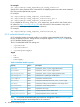
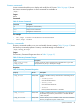
The iLO 3 embedded health CLP settings are:
• /system1/fan*
• /system1/sensor*
• /system1/powersupply*
Targets
• Fan
• Sensor
• Powersupply
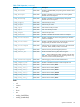
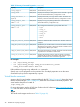
Table 8 Embedded Health Properties
DescriptionAccessProperty
Displays fan, sensor, or power supply label numberReadDeviceID
Displays fan, sensor, or power supply locationReadElementName
Displays fan, sensor, or power supply operational statusReadOperationalStatus
Displays if fan is operating at variable speedReadVariableSpeed
Displays the current fan speedReadDesiredSpeed
Displays the health status of the fan, sensor, or power supplyReadHealthState
Displays the reading units for temperature and voltage sensorsReadRateUnits
Displays the current reading of sensorReadCurrentReading
Displays the sensor typeReadSensorType
Displays temperature sensor caution valueReadOemhp_CautionValue
Displays temperature sensor critical valueReadOemhp_CriticalValue
NOTE: All available embedded health properties from all targets are shown in Table 8 (page
44). The actual properties returned depend on the command.
44 SMASH CLP Scripting Language