
HP iLO 3 Scripting and Command Line Guide
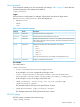


You must have the Configure iLO Settings privilege to change these properties. SSO is only
supported for browser access from trusted HP SIM servers. SSO is a licensed feature. Table 6 (page
38) shows the HP SSO properties. For more information, see the HP iLO User Guide on the HP
website at http://www.hp.com/go/ilo3 and click More iLO Documentation.
Targets
None
Table 6 HP SSO Properties
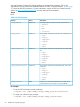
DescriptionAccessProperty
The Single Sign-On required trust level. Valid values are:Read/writeoemhp_ssotrust
• disabled
• all
• name
• certificate
The privileges associated with the user role. Valid values are:Read/writeoemhp_ssouser
• login
• oemhp_rc
• oemhp_power
• oemhp_vm
• config
• admin
The privileges associated with the operator role. Valid values
are:
Read/writeoemhp_ssooperator
• login
• oemhp_rc
• oemhp_power
• oemhp_vm
• config
• admin
The privileges associated with the administrator role. Valid
values are:
Read/writeoemhp_ssoadministrator
• login
• oemhp_rc
• oemhp_power
• oemhp_vm
• config
• admin
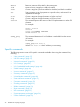
Contains 0 or more HP SIM Trusted Server records. Each
record contains a server name or a server certificate.
Readoemhp_ssoserver
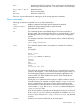
For example
• To set the SSO trust level to trust by certificate:
</>hpiLO-> set /map1/oemhp_ssocfg1 oemhp_ssotrust=certificate
• To assign user roles the Login privilege:
</>hpiLO-> set /map1/oemhp_ssocfg1 oemhp_ssouser=login
38 SMASH CLP Scripting Language