
HP iLO 3 Scripting and Command Line Guide


User commands
User commands enable you to view and modify user settings. Table 5 (page 37) shows the User
Command properties. User settings are located at:
/map1/accounts1.
Targets
All local users are valid targets. For example, if three local users have the login names
Administrator, admin, and test, then valid targets are:
• Administrator
• admin
• test
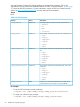
Table 5 User Command Properties
DescriptionAccessProperty
Corresponds to the iLO 3 login name.read/writeusername
Corresponds to the password for the current user.read/writepassword
Displays the name of the user. If a name is not specified, the parameter uses the
same value as the login name (username). This value corresponds to the iLO 3
user name property.
read/writename
Specifies the privilege level. The valid values are as follows:read/writegroup
• admin
• config
• oemhp_power
• oemhp_rc
• oemhp_vm
If you do not specify a group, no privileges are assigned to the user.
Displays or modifies the user SSH key.read/writesshkeyhash
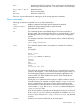
For example
The current path is:
/map1/accounts1.
• create username=lname1 password=password
In this example, username corresponds to the login name.
• create /map1/accounts1 username=<lname1> password=<pwd12345>
name=<dname1> group=<admin,config,oemhp_vm,oemhp_rc,oemhp_power>
In this example, lname1 is the login name of the user.
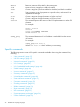
• oemhp_loadsshkey -source http://192.168.100.1/pubkey.ppk
/map1/accounts1/<1name1>
This example loads the SSH key to the specified user 1name1.
• oemhp_deletesshkey /map1/accounts1/<1name1>
This example removes the SSH key from the account 1name1.
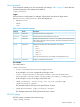
HP SSO settings
HP SSO settings commands are accessed using:
/map1/oemhp_ssocfg1.
Specific commands 37