
HP iLO 3 Scripting and Command Line Guide



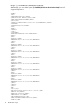
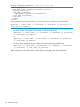

Example 2 Web agent example (Mod_SNMP_IM_Settings.xml):
<RIBCL VERSION="2.0">
<LOGIN USER_LOGIN="adminname" PASSWORD="password">
<RIB_INFO MODE="write">
<MOD_SNMP_IM_SETTINGS>
<WEB_AGENT_IP_ADDRESS value=%WebAgent%/>
</MOD_SNMP_IM_SETTINGS>
</RIB_INFO>
</LOGIN>
</RIBCL>
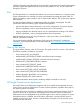
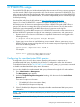
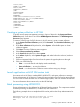
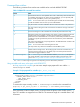
To execute this script correctly, use the -t namevaluepairs switch on the command line:
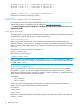
hpqlocfg –s <ipV4 addr> –f <filename> –u <username> –p <password> –t
<web_agent_IP_address>
• For IPv6, without specifying the port number, invoke the script using:
hpqlocfg –s [<ipV6 addr>] –f <filename> –u <username> –p <password>
–t <web_agent_IP_address>
or
hpqlocfg –s <ipV6 addr> –f <filename> –u <username> –p <password>
–t <web_agent_IP_address>
• For IPv6, when specifying the port number, invoke the script using the following:
hpqlocfg –s [<ipV6 addr>]:<portnumber> –f <filename> –u <username>
–p <password> –t <web_agent_IP_address>
When replacing a token that requires double quotes, use single quotes around the token.
20 HPQLOCFG usage