
HP iLO 3 Scripting and Command Line Guide



Command line switches
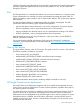
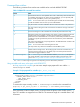
The following command line switches are available to be used with HPQLOCFG.EXE:
Table 2 HPQLOCFG command line switches
EffectSwitch
Determines the iLO that is to be updated. This switch is followed by either the DNS name
or IP address of the target server. When using IPv6 addresses, you can optionally add
the port number preceded by a colon (<IPv6_address:port>).
NOTE: Do not use this switch if you are launching from HP SIM. HP SIM automatically
provides the address of the iLO when you launch HPQLOCFG.
-S
Full path location and name of the RIBCL file that contains the actions to be performed.-F
User login name. Entering this at the command line overrides the user login name from
the script.
-U
Password. Entering this at the command line overrides the password from the script.-P
Defines the log file name and file location. If this switch is omitted, a default log file with
the DNS name or the IP address is created in the same directory used to launch
-L
1
HPQLOCFG. Ensure that HPQLOCFG is in a directory referenced by the PATH environment
variable. Any log files generated are placed in the same directory as the HPQLOCFG
executable.
This switch cannot designate an output log filename. The default filename is based on the
DNS name or the IP address.
NOTE: Do not use this switch if launching from HP SIM.
The output values may need to be modified to match the RIBCL syntax.
Enables verbose message return. The resulting log file contains all commands sent, all
responses received, and any errors. By default, only errors and responses from GET
commands are logged without this switch.
-V
1
The -t namevaluepairs switch substitutes variables (%variable%) in the input file
with values specified in name-value pairs. Separate multiple name-value pairs with a
comma. See “Using variables and name value pairs with HPQLOCFG” (page 19).
-t namevaluepairs
1
The -L and -V switches might or might not be set depending on the IT administrator preferences.
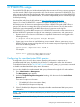
Using variables and name value pairs with HPQLOCFG
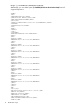
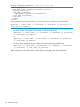
In Script prepared for variables you can see a sample script prepared for use with the -t
namevaluepairs switch.
Example 1 Script prepared for variables (Get_Asset_Tag.xml)
<RIBCL VERSION="2.0">
<LOGIN USER_LOGIN="%user%" PASSWORD="%password%">
<SERVER_INFO MODE="read">
<GET_ASSET_TAG/>
</SERVER_INFO>
</LOGIN>
</RIBCL>
To execute this script correctly, use the -t namevaluepairs switch on the command line:
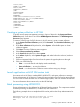
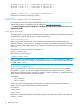
hpqlocfg -f get_asset_tag.xml -s <serverip> -t user=Admin,password=pass
If the parameter contains multiple words, you must enclose the phrase within double quotes (" ").
Up to 25 variables are supported in an XML file. The maximum length of a variable name is 48
characters.
HPQLOCFG command line parameters 19