
HP iLO 3 Scripting and Command Line Guide



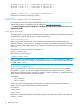

HPQLOCFG -S RIB1 -F C:\...SCRIPT.XML -L RIB1LOG.TXT -V
HPQLOCFG -S RIB2 -F C:\...SCRIPT.XML -L RIB2LOG.TXT -V
HPQLOCFG -S RIB3 -F C:\...SCRIPT.XML -L RIB3LOG.TXT -V
.
.
.
RIBNLOG -S RIBN -F C:\...SCRIPT.XML -L LOGFILE.TXT -V
HPQLOCFG overwrites any existing log files.
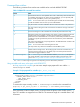
HPQLOCFG command line parameters
For information on the syntax of the XML data files, see “RIBCL XML Scripting Language” (page 60).
Sample XML scripts are available on the HP website at www.hp.com/go/iLO3.
. Click HP iLO Sample Scripts for Windows or HP Lights-Out XML Scripting Sample for Linux under
Helpful Downloads.
Using quote characters
The restrictions for using single and double-quote characters are based on whether they are passed
to HPQLOCFG inside an XML scripts or on the command line.
Quotes inside XML scripts
When using an XML script to enter the user name and password use the double-quote (") as
delimiters. However, if you must use " inside the user name or password in the XML file (if the user
name or password has double quotes in it), change the outside double-quote delimeters to single
quotes (').
For example, consider a username with quotes in it:
Sample"simple"name
This must be in an XML script as:
'Sample"simple"name'
NOTE: Support for Windows-specific smart-quotes (“ ” and ‘ ’) as content delimiters in XML is
being phased out. Be sure to replace any smart-quote characters in your script with normal double
or single quotes (" and ').
Quotes on the command line
When using HPQLOCFG or LOCFG and entering the password or command on the command
line with the -p option, you cannot normally use the double-quote special character ("), except
when using an ampersand (&) or less-than (<) symbol. To enter a password or command that uses
either of these special characters, use double-quotes.
For example:
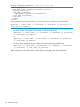
• "admin&admin"
• "admin<admin"
When using LOCFG and entering the password or command on the command line with the -i
option, do not include double-quotes around the password.
For example:
admin&admin
admin<admin
Passwords or commands delimited with double-quotes do not work on the LOCFG command line
with the -i option.
18 HPQLOCFG usage