
HP iLO 3 Scripting and Command Line Guide


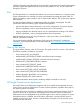

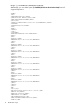
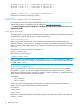
<SSO>0</SSO>
<PWRM>3.0</PWRM>
<ERS>0</ERS>
<EALERT>1</EALERT>
</MP>
<BLADESYSTEM>
<BAY>1</BAY>
<MANAGER>
<TYPE>Onboard Administrator</TYPE>
<MGMTIPADDR>123.456.78.90</MGMTIPADDR>
<RACK>TestRACK</RACK>
<ENCL>TestRACKEnc-C</ENCL>
<ST>2</ST>
</MANAGER>
</BLADESYSTEM>
</RIMP>
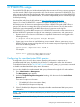
Creating a system collection in HP SIM
To quickly see all system management processors, login to SIM and in the System and Event
Collections panel, scroll down to and select All Management Processors. The All Management
Processors page appears.
To create a custom group of all iLO devices (or by iLO version), create a system collection.
1. In the System and Event Collections panel, click Customize. The Customize Collections page
appears.
2. In the Show collections of dropdown list, select Systems. All available system or cluster
collections appear.
3. Click New. The New Collection section appears.
4. Select Choose members by attributes.
5. In the Search for dropdown list, select systems .
6. In the where dropdown, select system sub type, and select is from the inclusion/exclusion
dropdown.
7. Select an Integrated Lights-Out choice from the system sub type dropdown at the right.
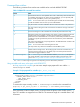
8. Click one of the following:
• View — to run the search and display results immediately.
• Save as Collection — to save the collection.
• Cancel — to close the New Collection section without saving any changes.
Launch applications with HP SIM custom tools
Use custom tools in HP SIM to combine RIBCL, HPQLOCFG, and system collection to manage
Group Administration of iLO devices. Custom tools are executed on the CMS and on target systems.
You can create a remote tool that runs on selected target systems, and even schedule its execution.
For more information about custom tools, see the HP SIM help.
Batch processing using HPQLOCFG
Group Administration is also delivered to iLO through batch processing. The components needed
for batch processing are HPQLOCFG, an RIBCL file, and a batch file.
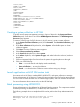
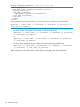
The following example shows a sample batch file used to perform the Group Administration for
iLO:
REM Updating the HP Integrated Lights-Out 3 board
REM Repeat line for each board to be updated
REM
Creating a system collection in HP SIM 17