
HP iLO 3 Scripting and Command Line Guide



GET_ONE_TIME_BOOT return messages
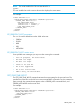
A possible GET_ONE_TIME_BOOT return message includes:
<?xml version="1.0"?>
<RIBCL VERSION="2.23">
<RESPONSE
STATUS="0x0000"
MESSAGE='No error'
/>
<ONE_TIME_BOOT>
<BOOT_TYPE VALUE="USB"/>
</ONE_TIME_BOOT>
</RIBCL>
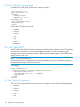
Possible BOOT_TYPE values include:
• NORMAL
• FLOPPY
• CDROM
• HDD
• USB
• RBSU
• NETWORK
SET_ONE_TIME_BOOT
The SET_ONE_TIME_BOOT command configures a single boot from a specific device. The specified
user must have a valid iLO account to execute RIBCL commands. For this command to parse
correctly, the command must appear within a SERVER_INFO command block, and SERVER_INFO
MODE must be set to write.
NOTE: This code modifies EVs.
The persistent boot is accomplished by reading and modifying CQHIPL, and reading CQHNIPL
to determine the number of valid boot devices.
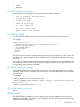
For example:
<RIBCL VERSION="2.0">
<LOGIN USER_LOGIN="adminname" PASSWORD="password">
<SERVER_INFO MODE="write">
<SET_ONE_TIME_BOOT value = "NORMAL"/>
</SERVER_INFO>
</LOGIN>
</RIBCL>
SET_ONE_TIME_BOOT parameters
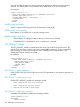
The value sets a specified device as the source for a single boot. Valid values include the following:
• NORMAL
• FLOPPY
• CDROM
• HDD
• USB
118 RIBCL XML Scripting Language