
HP iLO 3 Scripting and Command Line Guide
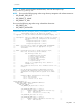
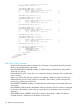



NOTE: This code modifies EVs. The one time boot EV is:
CQTBT1.
This was modified to set the one-time boot and to display the current status.
For example:
<RIBCL VERSION="2.0">
<LOGIN USER_LOGIN="adminname" PASSWORD="password">
<SERVER_INFO MODE="write">
<SET_PERSISTENT_BOOT>
<DEVICE value = "FLOPPY" />
<DEVICE value = "CDROM" />
</SET_PERSISTENT_BOOT>
</SERVER_INFO>
</LOGIN>
</RIBCL>
SET_PERSISTENT_BOOT parameters
The value sets the default boot order. Valid values are:
• CDROM
• FLOPPY
• HDD
• USB
• NETWORK
SET_PERSISTENT_BOOT runtime errors
Some possible error messages you may see when running this command:
• Post in progress, EV unavailable.
• EV name too large.
• EV data too large.
• There is no such EV.
• EV is not supported.
• EV is not initialized.
• ROM is busy, EV unavailable.
GET_ONE_TIME_BOOT
The GET_ONE_TIME_BOOT command retrieves the current setting for the one time boot. The
specified user must have a valid iLO account to execute RIBCL commands. For this command to
parse correctly, the command must appear within a SERVER_INFO command block, and
SERVER_INFO MODE must be set to read.
For example:
<RIBCL VERSION="2.0">
<LOGIN USER_LOGIN="adminname" PASSWORD="password">
<SERVER_INFO MODE="read">
<GET_ONE_TIME_BOOT/>
</SERVER_INFO>
</LOGIN>
</RIBCL>
SERVER_INFO 117