
HP iLO 3 Scripting and Command Line Guide





User does NOT have correct privilege for action. CONFIG_ILO_PRIV
required.
HOTKEY_CONFIG
The HOTKEY_CONFIG command configures the remote console hot key settings in iLO. For this
command to parse correctly, the command must appear within a RIB_INFO command block, and
RIB_INFO MODE must be set to write. The user must have the configure iLO privilege to execute
this command.
Upper or lower case values are automatically changed to the proper case as needed (lower case
is changed to upper case if needed, and upper case is changed to lower case if needed.) If you
use double or single quotes, it must be different from the delimiter. Specifying a blank string removes
the current value.
NOTE: Each hot key can have up to five selections (for example, CTRL_T="CTRL,ALT,ESC,F2,F4").
Do not use spaces (“ “) in the values; to set a space in a value type SPACE.
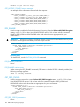
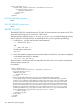
Use this command to configure hotkeys in iLO 3 v1.50 or later. Use HPQLOCFG.EXE version 1.00
or later with this command. Replace USER_LOGIN and PASSWORD values with values that are
appropriate for your environment.
<RIBCL VERSION="2.0">
<LOGIN USER_LOGIN="adminname" PASSWORD="password">
<RIB_INFO MODE="write">
<HOTKEY_CONFIG>
<CTRL_T value="CTRL,ALT,ESC"/>
<CTRL_U value="L_SHIFT,F10,F12"/>
<CTRL_V value=""/>
<CTRL_W value=""/>
<CTRL_X value=""/>
<CTRL_Y value=""/>
</HOTKEY_CONFIG>
</RIB_INFO>
</LOGIN>
</RIBCL>
HOTKEY_CONFIG parameters
The following parameters are optional. If a parameter is not specified, then the parameter value
remains as previously set. Separated multiple setting values with commas (see example script
above.) Up to five keystrokes can be configured for each hot key.
• CTRL+T
• CTRL+U
• CTRL+V
• CTRL+W
• CTRL+X
• CTRL+Y
Supported hot keys
The Program Remote Console Hot Keys page allows you to define up to six different sets of hot
keys for use during a Remote Console session. Each hot key represents a combination of up to five
different keys which are sent to the host machine whenever the hot key is pressed during a Remote
Console session. The selected key combination (all keys pressed at the same time) are transmitted
102 RIBCL XML Scripting Language