
HP iLO 3 Scripting and Command Line Guide





GET_SECURITY_MSG
Use this command to retrieve the security message for the iLO login screen. Use this command with
iLO 3 v1.50 or later.
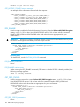
<RIBCL VERSION="2.0">
<LOGIN USER_LOGIN="adminname" PASSWORD="password">
<RIB_INFO MODE="read">
<GET_SECURITY_MSG/>
</RIB_INFO>
</LOGIN>
</RIBCL>
GET_SECURITY_MSG parameters
None
GET_SECURITY_MSG return messages
The following information is returned with the response:
• SECURITY_MSG value=”Enabled” or “Disabled”
• SECURITY_MSG_TEXT:
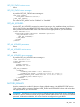
<SECURITY_MSG_TEXT>
<![CDATA[The security message appears here, set using SET_SECURITY_MESSAGE.]]>
</SECURITY_MSG_TEXT>
GET_SECURITY_MSG runtime errors
None
SET_SECURITY_MSG
Use this command to configure the security text message in the iLO Login Banner. The Login Security
Banner feature allows you to configure the security banner displayed on the iLO login screen. You
need to have configure iLO Setting privileges to make changes to the banner.Use this command
with iLO 3 v1.50 or later.
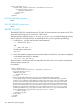
<RIBCL VERSION="2.0">
<LOGIN USER_LOGIN="adminname" PASSWORD="password">
<RIB_INFO MODE="write">
<SET_SECURITY_MSG>
<SECURITY_MSG value="y"/>
<SECURITY_MSG_TEXT>
<![CDATA[ message ]]>
</SECURITY_MSG_TEXT>
</SET_SECURITY_MSG>
</RIB_INFO>
</LOGIN>
</RIBCL>
SET_SECURITY_MSG parameters
SECURITY_MSG—Boolean value, must be either Yes (enabled) or No (disabled). When the value
is No, the security message is removed.
SECURITY_MSG_TEXT—CDATA text message to appear when SECURITY_MSG is set to Yes. Enter
the text of the message between <![CDATA[ and ]]>.
SET_SECURITY_MSG runtime errors
The value for the SECURITY_MESSAGE parameter must a Y or an N, otherwise the command
reports an error. You may also see this error:
RIB_INFO 101