
HP iLO 3 Scripting and Command Line Guide
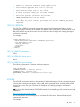
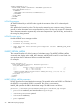
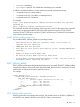
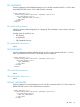
</RIBCL>
GET_ALL_LANGUAGES parameters
None
GET_ALL_LANGUAGES runtime errors
None
SET_ASSET_TAG
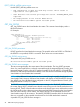
Use this command to set or clear the asset tag. Use this command with iLO 3 v1.50 or later. Use
HPQLOCFG.EXE version 1.00 or later with this command.
You must have the following privileges to execute this command: Virtual Media, Virtual Power and
Reset, Remote Console.
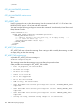
<RIBCL VERSION="2.0">
<LOGIN USER_LOGIN="adminname" PASSWORD="password">
<SERVER_INFO MODE="write">
<!-- Enter a string to set the asset tag, or an empty string -->
<!-- to clear the asset tag. -->
<SET_ASSET_TAG VALUE ="Asset Tag"/>
</SERVER_INFO>
</LOGIN>
</RIBCL>
SET_ASSET_TAG parameters
SET_ASSET_TAG sets or clears the asset tag. Enter a string to add or modify the asset tag, or enter
an empty string to clear the asset tag.
SET_ASSET_TAG runtime errors
A possible SET_ASSET_TAG error message is:
Problem manipulating EV
This message means that the asset tag was not set. Retry the procedure later.
Other possible error message for SET_ASSET_TAG include:
• Post in progress, EV unavailable.
• EV name too large.
• EV data too large.
• There is no such EV.
• EV is not supported.
• EV is not initialized.
• ROM is busy, EV unavailable.
• User does NOT have correct privilege for action. VIRTUAL_MEDIA_PRIV
required.
• User does NOT have correct privilege for action. RESET_SERVER_PRIV
required.
• User does NOT have correct privilege for action. REMOTE_CONS_PRIV
required.
• String too long, maximum string length is 32 characters.
100 RIBCL XML Scripting Language