
HP iLO 3 Release Notes


• iLO 3 1.50 and later does not send ARP before replying to a ping request. This causes iLO 3 to
be unreachable to pings from clients with teamed NICs.
• c-Class blade servers might request maximum power when the server is powered on.
Prerequisites
• iLO 3 1.2x must be installed before you can update to iLO 3 1.61 or later.
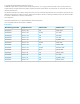
• If you use any of the following utilities, update them to the versions shown below. The minimum
versions are required for IPv6 support.
NotesVersion
in iLO 3
1.70
Minimum
Version
Utility
This replaces the CPQLOCFG utility.1.11.0HPQLOCFG
Requires Channel Interface Driver (CHIF) version 3.9.0.0.4.3.04.2.0HPONCFG
Available in the HP Lights-Out XML Scripting Sample bundle.4.304.20LOCFG.PL
Update to at least the minimum version of HPLOMIG before installing the iLO 3
1.70 firmware.
4.304.20HPLOMIG
• Some iLO 3 features are part of an iLO licensing package. For more information about iLO
licensing, see the following website: http://www.hp.com/go/ilo/licensing.
• You must install Java Runtime Environment Standard Edition 1.4.2_13 or later to use the Java
Integrated Remote Console.
• You must install the Microsoft .NET Framework 3.5 Service Pack 1 to use the .NET version of the
Integrated Remote Console.
• The .NET Integrated Remote Console is launched using Microsoft ClickOnce, which is part of the
.NET Framework.
◦ Mozilla Firefox requires an add-on to launch a ClickOnce application. You can launch the
.NET IRC from a supported version of Firefox using a ClickOnce plug-in such as the Microsoft
.NET Framework Assistant. You can download the .NET Framework Assistant from the
following website: https://addons.mozilla.org/en-US/firefox/addon/
microsoft-net-framework-assist/.
◦ Google Chrome requires an add-on to launch a ClickOnce application. You can launch the
.NET IRC from a supported version of Chrome using the ClickOnce plugin for the Chrome
browser. You can download this plugin from the following website: http://code.google.com/
p/clickonceforchrome/.
Installation instructions
See the following document for installation instructions:
HP iLO 3 User Guide
Part number: 616301-005
Edition: 1
Prerequisites 5